

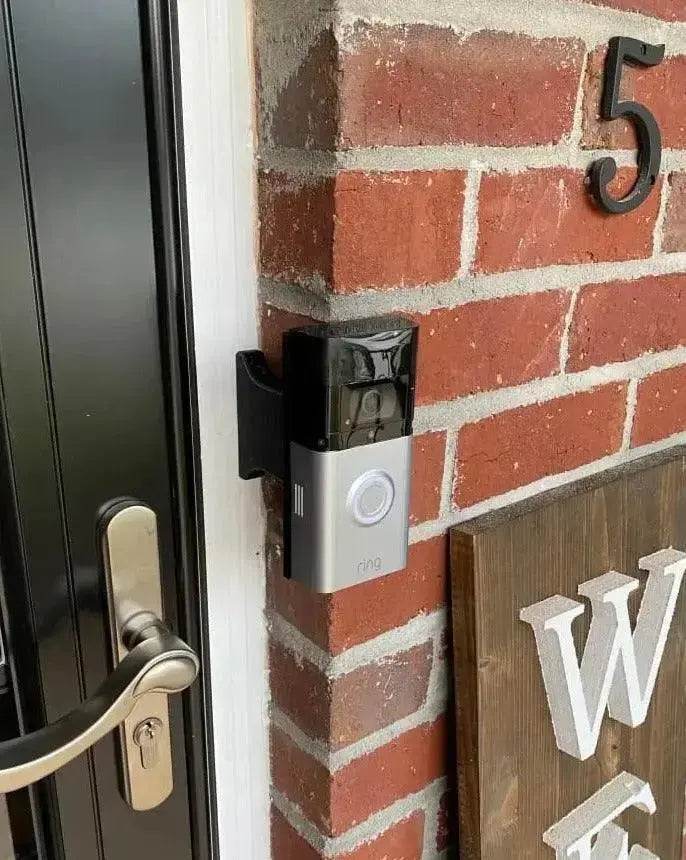
Standard Offset Brick Extension for the Ubiquiti UniFi G6 Entry (2024) — Custom Depth Brick Install
Standard Offset Brick Mount Engineered for the Ubiquiti G6 Entry
The Ubiquiti UniFi G6 Entry is a wired (16-24V AC) doorbell, and brick installs benefit from getting the doorbell projection right. This Standard Offset Brick Extension is custom-cut for your exact gap from 3/4" up to 8" in 1/8" increments, with a slim 9/16" base that fits standard wood trim. Front bracket sized exactly for the G6 Entry mounting back — no shimming, no improvising.
Engineered for the Ubiquiti UniFi G6 Entry (Amazon ASIN UVC-G6-Entry). 3D-printed to-order in the USA from UV-stable PETG, freeze-tolerant. Free shipping on orders over $100, ships in 2-3 business days, Replacement Guarantee covers a depth swap if your measurement is off.
Compatibility — Custom-Cut for the Ubiquiti UniFi G6 Entry
- This Standard Offset extension is custom-cut for the Ubiquiti UniFi G6 Entry — Amazon ASIN UVC-G6-Entry. Ubiquiti’s G6 Entry doorbell with the wired (16-24V AC) setup.
- Does NOT fit: other Ubiquiti doorbell models with different mounting backs, or any non-Ubiquiti video doorbell. Each major doorbell body has its own dedicated brick mount on our store.
- Not sure which Ubiquiti model you have? Send a photo of the back of your doorbell to shop@doorbellmount.com — we’ll confirm fit before you order.
Standard Offset Brick Mount — Push Past Storm Doors and Trim
Standard Offset is the most popular brick mount choice. It pushes the doorbell forward enough to clear storm doors, weather stripping, and most trim — without the deeper projection of Full Offset. Default 3 inch size fits the majority of installs.
Standard Offset Brick Extension Dimensions & Material
- Front Face Width: Sized to fit the Ubiquiti G6 Entry mounting back exactly
- Base Width: 9/16 inch (slim profile, fits within standard wood trim)
- Projection Depth: Custom-cut from 1/4 inch up to 8 inches in 1/8 inch increments
- Pricing: Scales with depth from $38 to $120
- Base Mounting: 2 holes, anchor in WOOD TRIM with #6 screws (#2 Phillips driver)
- Material: UV-stable PETG, 3D-printed in the USA, freeze-tolerant
Installing Your Standard Offset Brick Extension on the Ubiquiti G6 Entry
-
Prepare: Ubiquiti G6 Entry requires 16-24V AC.
Ubiquiti G6 Entry requires 16-24V AC. Turn OFF power at the breaker before disconnecting wires. A 30VA transformer is recommended for reliable streaming.
- Route Wires: Lead the 16-24V wires through the rear of the brick extension and out the front.
- Mount the Extension Base: Anchor the back over wood trim with 2 provided #6 wood screws using a #2 Phillips screwdriver.
- Attach the Mounting Bracket: Fasten the Ubiquiti G6 Entry adapter bracket to the front using the 4 small #4 center screws. USE #1 Phillips PRECISION screwdriver.
- Connect the Doorbell: Strip wires (1/4 inch) and connect to the Ubiquiti terminals. Polarity does NOT matter for AC.
- Secure and Finalize: Mount the Ubiquiti G6 Entry to the bracket. Reinstall cover. Open the Ubiquiti app, check Live View, redraw motion zones to match the new mounting position.
FAQ — Ubiquiti G6 Entry Standard Offset Brick Extension
✔ Replacement Guarantee — The Right Depth, Guaranteed
Send a picture of your install area BEFORE you order. We’ll confirm the exact depth that fits.
Need to Buy the Doorbell, Tools, or Caulk?
- Search Amazon for the Ubiquiti G6 Entry (2024)
- #1 Phillips PRECISION screwdriver
- Clear outdoor silicone caulk
Affiliate Disclosure: As an Amazon Associate, DoorbellMount.com earns from qualifying purchases at no extra cost to you.
Questions? Need Help Picking the Right Depth?
Email: shop@doorbellmount.com | Text/Call: 1-833-326-6868
Order your Standard Offset Brick Extension for the Ubiquiti G6 Entry (2024) today — free shipping over $100, Replacement Guarantee included.


