


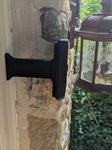

Brick Face Extension for the Tapo Doorbell Pro D260 4K Video Doorbell (Wired or Battery, 2026) — Bring a Recessed Doorbell Out Flush With the Brick
When the trim sits back from the brick, a Tapo Doorbell Pro D260 mounted on it looks straight into the masonry. This Brick Face Extension lifts the doorbell out to the face of the brick so its 4K, 180° view clears the wall — without drilling a single hole in the brick.
The extension is printed with a bracket for the Tapo D260. Select TP-Link Tapo D260, then your depth. It works whether you run the D260 on battery or hardwire it.
USA-made from UV-stable PETG and printed to your exact depth. Free shipping over $100. Doorbell details: Tapo D260 at TP-Link.
Tapo Doorbell This Brick Face Extension Is Offered For
Choose TP-Link Tapo D260 in the Doorbell Model dropdown, then the depth you measured.
- Tapo Doorbell Pro D260 (2026) — TP-Link's first 4K doorbell: 180° diagonal head-to-toe view, radar plus PIR motion sensing, color night vision, and local microSD storage (up to 512 GB) with no subscription required. Runs on its rechargeable battery (rated up to 180 days) or hardwired to 8-24V AC. IP66 weather rating, dual-band 2.4/5 GHz Wi-Fi. Body size about 5.73 × 2.57 × 1.42 inches. Buy on Amazon → · Specs at Tapo.com →
Important: This bracket is cut for the D260 body only. It does not fit the Tapo D130, D205, D210, D225, D230 or D235 — those use their own brackets, which you will find in our Tapo doorbell mounts collection.
Not 100% sure which Tapo you own? Use the photo upload option on this listing and we confirm before anything ships.
CRITICAL: How to Measure for the Brick Face Extension
Brick extensions are custom-cut to your exact depth. Two ways to measure:
Method A — You HAVE your doorbell: Hold the doorbell against the brick face and measure from the wood trim to the BACK of the doorbell. Order that depth.
Method B — You DON'T have your doorbell yet: Measure from the wood trim straight out to the FRONT face of the brick, then subtract about 1-1/2 inches — the D260 body is 1.42 inches deep. Round to the nearest 1/8 inch.

Want a second opinion? Add a photo and your measurement through the photo upload option on this listing and we'll confirm before shipping. Wrong size? We swap it free.
Brick Face Extension — sits FLUSH with the brick. Choose this when your doorbell would otherwise be recessed BEHIND the brick face. For storm-door clearance use the Standard Offset; for maximum side clearance use the Full Offset.
Full walkthrough: How to Mount a Doorbell on Brick or Concrete. Hardwiring the D260? See How to Install a Wired Doorbell.
Brick Face Extension Dimensions & Material
- Front Face: Bracket printed for the Tapo D260
- Base Width: 9/16 inch (slim profile, fits standard wood trim)
- Depth: 45 sizes from 1-1/2 inches to 8 inches in 1/8-inch increments
- Pricing: Scales with depth from $39 up to $98
- Material: UV-stable PETG, 3D-printed in the USA, freeze-tolerant
- Hardware: 2× #6 base screws (wall mount) + the Tapo D260 bracket
Key Features & Benefits
- Flush With the Brick: Brings a recessed D260 out to the brick face.
- 45 Custom Depths: 1-1/2 inches to 8 inches in 1/8-inch steps.
- Bracket Printed for the D260: Tapo Doorbell Pro body only.
- Wire Pass-Through: Hardwired doorbell wires route through the rear cavity.
- UV-Stable PETG: Outdoor rated, freeze-tolerant, made in the USA.
Brick Extension Add-Ons
- Angled trim? Angle Shim Set 5/10/15° or 25/30/35° squares the extension to the brick.
- Gap beside the brick? Brick Side Shim & Stabilizer.
- Gap below the bracket? Brick Bottom Filler Plate.
- Wires come out the side? Add a Side Wire Entry (hardwired D260 only).
- Color-matched hardware: Stainless screws in Black or White.
- Brick colors: Red, tan or gray prints are available in the color options on this page; Black is the default.
Installing Your Brick Face Extension on a Tapo D260
- Order the right version: Choose TP-Link Tapo D260 and your extension depth in the dropdowns.
- Remove the old doorbell: Hardwired? Power down at the breaker and disconnect both wires. Battery D260? Release it from its Tapo bracket and set it aside.
- Route the wires (hardwired only): Feed both low-voltage wires through the rear channel of the extension to the front face.
- Mount the extension base: Position the extension on the trim, check it with a level, and fasten with the included #6 wood screws (#2 Phillips). Pilot holes help in hardwood.
- Attach the bracket: Attach the D260 bracket to the extension front using the small center screws. Use a #1 Phillips PRECISION driver.
- Mount the doorbell: Attach the wires to the D260 terminals if hardwired, then seat the doorbell on the bracket with the screws PROVIDED WITH THIS MOUNT.
- Finish up: Restore power or press the power button, then verify the camera view in the Tapo app.
Tools: #2 Phillips screwdriver, #1 Phillips PRECISION screwdriver, drill (optional pilot holes), level. Multimeter only if you hardwire.
FAQ — Brick Face Extension for the Tapo D260
✔ Replacement Guarantee — We Review Your Photos Before It Ships
Upload photos of your Tapo D260, trim and brick, along with your measurement, using the photo upload option on this listing. We check them before shipping so your extension arrives at the right depth with the right bracket — fit guaranteed.
- Before it ships: Send photos of the trim, brick and doorbell through the photo upload option on this listing.
- Problems after install? Contact 1-833-326-6868, or email shop@doorbellmount.com.
Doorbell & Install Tool Links
Tapo doorbell:
- Tapo Doorbell Pro D260 4K Video Doorbell (2026) — ASIN B0GYC5HJ2R on Amazon
- Tapo D260 product page and spec sheet at Tapo.com
Install tools & supplies:
- #1 Phillips PRECISION screwdriver — for the #4 bracket screws
- #2 Phillips screwdriver — for the #6 wall screws
- 16-24V AC doorbell transformer — if you hardwire the D260 and your old transformer is weak
Affiliate Disclosure: As an Amazon Associate, DoorbellMount.com earns from qualifying purchases at no extra cost to you. These small commissions help fund development of new mounts and brackets.
Questions About Measuring to the Brick Face?
Upload photos with the photo upload option on this listing, or reach us directly:
- Email: shop@doorbellmount.com
- Text/Call: 1-833-326-6868
Color: Default color is Black. Use the color options on this page for brick colors and others.
Tapo and TP-Link are trademarks of TP-Link Corporation. DoorbellMount.com is an independent manufacturer and is not affiliated with or endorsed by TP-Link. The doorbell is not included.
Order your Brick Face Extension for the Tapo Doorbell Pro D260 today — flush with the brick, custom depth, bracket made for the D260, photo-reviewed before shipping at DoorbellMount.com.