


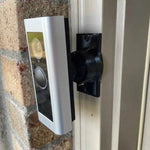
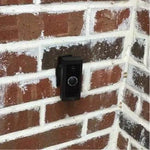
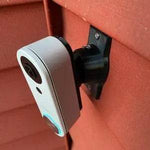
0-35° Adjustable Mount for the Xfinity Home Video Doorbell (SCHB1AEW)
Built for the Xfinity Home Video Doorbell (model SCHB1AEW) — Comcast's video doorbell for the Xfinity Home security service. 1080p HD video, 155° diagonal field of view (132° H × 98° V), 4:3 aspect ratio, IR night vision (~16 ft), two-way audio, IP55 weatherproof, and integration with the Xfinity X1 TV box for visitor pop-ups on your TV. Hardwired-only, requires existing Xfinity Gateway + Xfinity Home subscription. The bracket cradles the Xfinity SCHB1AEW body specifically and the 0-35° dual-axis ball joint aims the wide frame in any direction. Outdoor PETG, made-to-order in the USA.
Custom-Fit for the Xfinity Home Video Doorbell
This bracket is shaped specifically for the Xfinity Home Video Doorbell — model number SCHB1AEW, Amazon ASIN B0B1W6WV2S (Black). Comcast's Xfinity-branded doorbell with: 1080p HD video, 155° diagonal field of view (132° H × 98° V), 4:3 aspect (wider porch view), IR night vision up to 16 ft / 5m, two-way audio, motion alerts, IP55 weatherproof, integrates with the Xfinity Home app + X1 TV box (visitor doorbell pops up on your TV), and pairs with up to 6 Xfinity Cameras + Doorbells per gateway. Wired-only operation: requires existing 16-24V AC doorbell wiring, an Xfinity Gateway, and an active Xfinity Home Security subscription. Body: 4.6" × 1.6" × 1.3" (slim, fits narrow trim).
Does NOT fit: any non-Xfinity doorbell. Xfinity's body is unique to the SCHB1AEW. Does not fit Ring, Nest, Wyze, Eufy, Aqara, Tapo, Arlo, ecobee, Reolink, or any other consumer brand. Xfinity historically only makes one video doorbell, so this listing covers their full lineup.
How to confirm: The Xfinity Video Doorbell has the Xfinity logo on the front, model number SCHB1AEW on the back, and is added to your Xfinity Home account through the Xfinity Home app. It only works with active Xfinity Home Security service — without it, the doorbell becomes inert (no app, no live view, no recordings).
Xfinity X1 TV Pop-Up + Pro-Monitored — Aim It Right
The Xfinity Doorbell's killer feature is the X1 TV box integration — when someone rings your doorbell or motion is detected, a live view picture-in-picture pops up on whatever Xfinity X1 TV you're watching. Press a button on your remote to talk back. That's a real differentiator for Comcast households that already have X1 set-top boxes, similar to how Roku TV households pick the Roku doorbell. Plus full Xfinity Home Security integration for the central station / pro-monitoring side.
The 155° diagonal view is plenty for typical porches, but only when aimed at the porch and not the wall. This 0-35° dual-axis swivel mount rotates the Xfinity Doorbell in any direction up to 35°, locks permanently with set screws, and routes the existing 16-24V wires cleanly through the joint. Locked aim is essential for the Xfinity Home pro-monitoring side — drift can register as a tamper event with the central station.
Two-Axis Aiming, 0-35° Range
One smooth ball joint. Aim left, right, up, or down — all the way to 35° in any direction. Lock with set screws.

Internal Wire Routing — Hidden & Protected
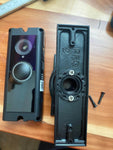
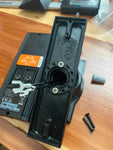
Low-voltage wires enter from the wall, pass through the hidden internal channel inside the ball-joint mount, route through the front adapter, and connect directly to the doorbell terminals.

Mount Dimensions
- Base Width: 1.8 inches
- Base Height: 3.1 inches
- Hole Spacing: 2-5/8 inches center-to-center
- Wall Extension at 0°: ~1.5 inches (low-profile)
What You Get
- Custom Bracket for Xfinity SCHB1AEW: Pre-shaped pocket fits the slim 4.6"-tall Xfinity body — flush, no rattle, no obstruction of the lens, mic, or speaker.
- Dual-Axis 0-35° Swivel: Aim the 155° 1080p frame precisely; lock with set screws.
- Wire Pass-Through: Routes 16-24V AC doorbell wires through the joint cleanly.
- Outdoor-Rated PETG: UV-stable, freeze-tolerant — exceeds the Xfinity's IP55 rating.
- Universal Base: Future-proof — switch doorbells later for a ~$10 adapter swap.
- Pro-Monitoring Friendly: Locked set screws prevent aim drift / Xfinity Home central-station tamper false-alerts.
- X1 Integration Friendly: Bracket geometry doesn't block the camera — picture-in-picture on your X1 TV stays clear.
Installing on the Xfinity Video Doorbell (SCHB1AEW)
- Verify Xfinity Home Account: The doorbell only works with active Xfinity Home Security service + an Xfinity Gateway on the same network. Confirm both before swapping.
- Coordinate With Xfinity Home Support: If your Xfinity Home is professionally monitored, call Xfinity Home support before swapping the mount and request a 1-hour test mode. Replacing the doorbell can register as a tamper event and trigger central-station response.
-
Power Down:Turn the breaker off at the chime circuit. Verify with a tester at the existing wires before pulling them through the mount.
- Verify Wiring: Confirm 16-24V AC at the doorbell location with a 10VA-min transformer. Xfinity Home requires hardwired power — no battery option.
- Mount the Base: Pull the doorbell wires through the hole in the swivel base, position vertical (Xfinity SCHB1AEW is taller than wide — 4.6" × 1.6"), secure with #6 screws (PH2 driver). Anchors as needed.
- Attach the Swivel: Route the wires through the swivel center, attach to the base with four #4 / PH1 center screws.
- Connect & Mount the Xfinity Doorbell: Connect the two doorbell-circuit wires to the Xfinity's screw terminals. Snap onto the bracket using the screws PROVIDED WITH THIS MOUNT (PH1 driver) — not Xfinity's stock plate.
- Pair via Xfinity Home App: Restore power. Open the Xfinity Home app → Add a Device → scan QR code on the doorbell. The Xfinity Gateway should auto-discover it on the local network.
- Aim & Lock + Configure X1 TV Pop-Ups: Live View in the Xfinity Home app → adjust the swivel until the 155° frame catches the porch fully → tighten set screws. In the Xfinity Home app, enable doorbell-press and motion picture-in-picture on your X1 TV box.
- Confirm Pro-Monitoring: Take the panel out of test mode with Xfinity Home support.
Service tip: the SCHB1AEW only works through Xfinity Home — like Vivint and Alarm.com doorbells, it needs the active service plan to function. If you're switching ISPs (cancelling Comcast Xfinity), plan to swap the doorbell too. Common alternatives for Comcast-leaving households: Ring (no subscription required for basic use), Nest (free on-device AI), or Eufy (no monthly fee with HomeBase). All have separate mounts on our store.
Questions About Fitment?
- Email: shop@doorbellmount.com
- Text/Call: 1-833-326-6868
Standard Color: Black or White.
Need to Buy Your Xfinity Doorbell?
Quick affiliate links to Xfinity doorbells on Amazon:
- Xfinity Home Video Doorbell SCHB1AEW — 1080p, Hardwired, X1 TV — B0B1W6WV2S
- Xfinity Home Video Doorbell — Comcast service info
- Xfinity Gateways — required for the doorbell to function
Affiliate Disclosure: As an Amazon Associate, DoorbellMount.com earns from qualifying purchases at no extra cost to you.
Angle Note: The 35° maximum is approximate; actual range varies slightly by surface and orientation.
3D-Printed Parts: Minor visible layer lines are normal and do not affect strength. Each mount is printed-to-order in our USA shop.
Aim your Xfinity Home Video Doorbell at the right spot — order the dedicated mount today.


