


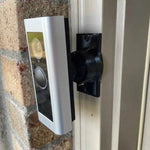
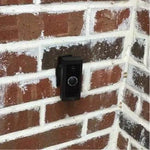
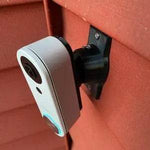
0-35° Adjustable Mount for the UniFi G4 Doorbell Pro PoE Kit (UVC-G4-Doorbell-Pro-PoE-Kit)
Built for the Ubiquiti UniFi G4 Doorbell Pro PoE Kit — the bundle for households without existing 16-24V doorbell wiring. Same physical doorbell as the standalone G4 Pro (5MP main + 8MP package camera, 138° H FOV, 1.8" front touchscreen, IPX4) but ships with a PoE adapter and Chime Pro in the box so you can run a single Ethernet drop to the porch and skip the AC transformer entirely. The bracket cradles the G4 Pro body (160.6 × 51.7 × 28.7 mm) and the 0-35° dual-axis ball joint aims the dual-cam frame in any direction. Outdoor PETG, made-to-order in the USA.
Custom-Fit for the UniFi G4 Doorbell Pro PoE Kit
This bracket is shaped specifically for the Ubiquiti UniFi G4 Doorbell Pro PoE Kit — model UVC-G4-Doorbell-Pro-PoE-Kit. Same physical doorbell as the standalone G4 Pro, with the kit adding: PoE adapter (converts existing 16-24V wires + adds PoE injection so a single Cat5/6 run powers the bell), UniFi Chime Pro (plug-in chime with Wi-Fi extender), and the appropriate brackets. Doorbell specs: 5MP main camera (138° H × 114° V × 155° D), 8MP package camera (97.5° H × 79.4° V × 118.2° D), 6m IR night vision, smart detections (people, vehicles, animals), two-way audio, integrated 1.8" programmable touchscreen, integrated chime + LED status ring, IPX4. Body 160.6 × 51.7 × 28.7 mm.
Same body as the standalone G4 Pro: if you already bought the standalone (UVC-G4-Doorbell-Pro) and added a PoE adapter separately, this same mount fits — the only difference between the two SKUs is what's in the box.
Does NOT fit: the original G4 Doorbell (UVC-G4-Doorbell — single cam, smaller 118.3 × 46.8 × 25.8mm body), the UniFi Doorbell Lite, or the UniFi G6 Entry / G6 Pro Entry. Each UniFi doorbell has its own dedicated mount listing. Also does not fit Ring, Nest, or any non-Ubiquiti brand.
One Cat6 Run, Two Cameras, Zero Cloud Subscription — Aim It Right
The PoE Kit is the cleanest way to install a UniFi Doorbell Pro at a new build or major remodel: run one Cat6 to the porch from your UniFi switch, plug the PoE adapter into the existing chime location (or use the Chime Pro instead), and you have power + data + chime + Wi-Fi extension in one bundle. No transformer headaches, no chime compatibility issues, no boot-loop voltage problems.
The dual-camera advantage (visitor face + package zone) only pays off if both lenses are aimed correctly. This 0-35° dual-axis swivel mount rotates the G4 Pro in any direction up to 35°, locks permanently with set screws, and routes the PoE Cat6 cleanly through the joint with no obstruction of either lens.
Two-Axis Aiming, 0-35° Range
One smooth ball joint. Aim left, right, up, or down — all the way to 35° in any direction. Lock the angle with set screws. Done.

Internal Wire Routing — Hidden & Protected
Cat6 PoE Ethernet (or 16-24V wires if you're using the existing AC chime side of the kit) enters from the wall, passes through the hidden internal channel inside the ball-joint mount, routes through the front adapter, and connects directly to the doorbell terminals. No exposed wiring, no weather risk.

Mount Dimensions
- Base Width: 1.8 inches
- Base Height: 3.1 inches
- Hole Spacing: 2-5/8 inches center-to-center
- Wall Extension at 0°: ~1.5 inches (low-profile)
- Narrow 3/4" baseplate option available for thin trim — see Customization below.
What You Get
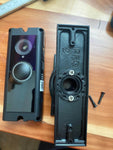
- Custom Bracket for G4 Doorbell Pro: Pre-shaped pocket fits the 160.6mm-tall G4 Pro body — same as the standalone G4 Pro mount.
- Dual-Axis 0-35° Swivel: Aim both cameras at the right zone simultaneously; lock with set screws.
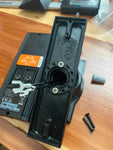
- PoE Cat6 Pass-Through: Routes Cat6 Ethernet (or AC wires if you're using the dual-power feature of the kit) through the joint cleanly.
- Outdoor-Rated PETG: UV-stable, freeze-tolerant — exceeds the G4 Pro's IPX4 rating.
- Siding Compatible: Flat surfaces and lapped siding up to 1.8" wide.
- Universal Base: Future-proof — switch doorbells later for a ~$10 adapter swap.
- Replaces 20° Wedge: Ubiquiti's stock mount is a fixed 20° wedge — this 0-35° dual-axis option adds the second axis you actually need for 90% of door installs.
Installing on the UniFi G4 Doorbell Pro PoE Kit
- Plan Your Cabling: The PoE Kit's biggest install win is running fresh Cat6 from a UniFi switch (or the included PoE adapter on the chime side) to the doorbell. If you don't have an existing wire chase, plan the cable route before mounting — through the basement, up the wall stud, into the porch.
-
Power Down (If Reusing Existing AC): If you're using the kit's PoE adapter that splices into existing 16-24V wires for both power and chime: turn the breaker off at the chime circuit before pulling wires through the mount.
- Adopt to UniFi Protect First: Power the doorbell on the PoE adapter indoors (or on a PoE switch), adopt it via UniFi Protect, configure both cameras, set up the front touchscreen (welcome message, PIN access, etc.), and verify chime works. Always easier indoors than at the porch.
- Mount the Base: Pull the Cat6 (or AC wires) through the hole in the swivel base, position vertical, secure with #6 screws (PH2 driver). Anchors as needed.
- Attach the Swivel: Route the cable through the swivel center, attach to the base with four #4 / PH1 center screws.
- Connect & Mount the G4 Pro: Plug in the PoE Ethernet (or wire to the AC terminals). Snap onto the bracket using the screws PROVIDED WITH THIS MOUNT (PH1 driver) — not Ubiquiti's stock 20° wedge plate.
- Aim & Lock: Live View in UniFi Protect → adjust the swivel until the 138° main camera covers the visitor zone AND the 8MP package cam catches the welcome mat → tighten the set screws.
- Plug in the Chime Pro Indoors: The kit's included Chime Pro plugs into any indoor outlet within Wi-Fi range — also acts as a Wi-Fi extender for the doorbell, so place it strategically.
Cable run tip: PoE works reliably up to 100m / 328 ft of Cat5e/Cat6. For runs >30 ft, use solid-core (not stranded) Cat6 to minimize voltage drop. The G4 Pro's dual cameras + touchscreen pull more juice than a typical PoE camera, so don't undersize the cabling.
Questions About Fitment?
- Email: shop@doorbellmount.com
- Text/Call: 1-833-326-6868
Standard Color: Ships in Black or White. Other colors via Color Change Request.
Need to Buy Your UniFi Doorbell?
UniFi cameras are sold direct via the Ubiquiti Store. Quick links:
- UniFi G4 Doorbell Pro PoE Kit — Ubiquiti Store (US)
- UniFi G4 Doorbell Pro (standalone, no PoE adapter) — Ubiquiti Store
- UniFi G4 Doorbell (original, single cam) — B08L3X9ZZX
- Ubiquiti UNVR — required for 24/7 local recording
Affiliate Disclosure: As an Amazon Associate, DoorbellMount.com earns from qualifying purchases at no extra cost to you. Ubiquiti Store links don't pay us a commission — just listed for convenience.
Angle Note: The 35° maximum is approximate; actual range varies slightly by surface and orientation.
3D-Printed Parts: Minor visible layer lines are normal and do not affect strength. Each mount is printed-to-order in our USA shop.
Aim your UniFi G4 Doorbell Pro PoE Kit at the right spot — order the dedicated mount today.


