


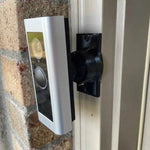
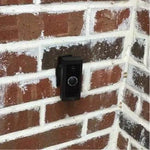
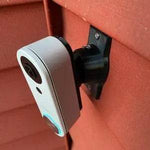
0-35° Adjustable Mount for the Kasa Smart Video Doorbell (KD110)
Built for the TP-Link Kasa Smart Video Doorbell KD110 — Kasa's hardwired doorbell with 2K (3MP) resolution, 160° diagonal field of view, person detection, two-way audio, IR night vision up to 30 feet, and microSD storage up to 256GB so you can avoid monthly cloud subscription fees. Includes a chime in the box. The bracket cradles the KD110 body specifically and the 0-35° dual-axis ball joint aims the wide frame in any direction. Outdoor PETG, made-to-order in the USA.
Custom-Fit for the Kasa KD110 Smart Doorbell
This bracket is shaped specifically for the Kasa Smart Video Doorbell KD110 — Amazon ASIN B09TG759WY. TP-Link Kasa's 2K (2304×1296, 3MP) wired doorbell with 160° diagonal field of view, person detection, two-way audio, IR night vision (up to 30 feet), microSD up to 256GB local storage (subscription-optional), IP64 weather rating, included indoor chime, Alexa + Google Assistant integration, and casting to Echo Show / Chromecast. Wired-only operation: requires existing 16-24V AC doorbell wiring with a 10VA-minimum transformer.
Does NOT fit: any Tapo doorbell (D130, D210, D225, D230S1 — TP-Link sells Kasa AND Tapo as separate brands with different bodies). Each Tapo doorbell has its own dedicated mount listing. Also does not fit Ring, Nest, Wyze, Eufy, Aqara, Arlo, ecobee, Reolink, or any other brand.
Confused Kasa vs. Tapo? They're both made by TP-Link but are separate product lines with separate apps. Kasa uses the Kasa Smart app; Tapo uses the Tapo app. The KD110 is the only Kasa-branded doorbell currently. If your box says Tapo (D130, D210, etc.), you need a Tapo-specific mount instead.
2K + microSD = No Subscription Required — Aim It Right
The Kasa KD110's quiet superpower is the microSD card slot — drop in a 256GB card and you have continuous local recording without paying the $3/month Kasa Care fee. Most $50-budget doorbells force you into a cloud subscription, but Kasa lets you keep ownership of your video. 2K resolution with person detection (not just generic motion) cuts way down on false alerts.
The 160° diagonal view catches a generous spread, but the camera needs to be aimed at the actual approach. This 0-35° dual-axis swivel mount rotates the KD110 in any direction up to 35°, locks permanently with set screws, and routes the existing 16-24V wires cleanly through the joint.
Two-Axis Aiming, 0-35° Range
One smooth ball joint. Aim left, right, up, or down — all the way to 35° in any direction. Lock the angle with set screws. Done.

Internal Wire Routing — Hidden & Protected
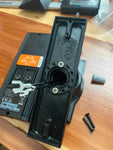
Low-voltage wires enter from the wall, pass through the hidden internal channel inside the ball-joint mount, route through the front adapter, and connect directly to the doorbell terminals. No exposed wiring, no weather risk.

Mount Dimensions
- Base Width: 1.8 inches
- Base Height: 3.1 inches
- Hole Spacing: 2-5/8 inches center-to-center
- Wall Extension at 0°: ~1.5 inches (low-profile)
- Narrow 3/4" baseplate option available for thin trim — see Customization below.
What You Get
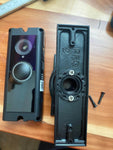
- Custom Bracket for Kasa KD110: Pre-shaped pocket fits the KD110 body — flush, no rattle, no obstruction of the lens, mic, or speaker.
- Dual-Axis 0-35° Swivel: Aim the 160° 2K frame precisely; lock with set screws.
- Wire Pass-Through: Routes 16-24V AC doorbell wires through the joint cleanly.
- microSD Slot Stays Accessible: Designed so you can pull/swap the microSD card from the rear without unmounting.
- Outdoor-Rated PETG: UV-stable, freeze-tolerant — exceeds the KD110's IP64 rating.
- Siding Compatible: Flat surfaces and lapped siding up to 1.8" wide.
- Universal Base: Future-proof — switch doorbells later for a ~$10 adapter swap.
Installing on the Kasa KD110 Doorbell
- Verify Wiring + Transformer: Confirm your existing doorbell circuit is 16-24V AC with at least a 10VA transformer (lower-VA transformers cause boot-loop issues on Kasa). If unsure, upgrade to a 30VA transformer — common $15 fix on Amazon.
-
Power Down: Turn the breaker off at the chime circuit. Verify with a tester at the existing wires before pulling them through the mount.
- Insert microSD Card: If you want subscription-free local recording, insert a microSD card (up to 256GB) into the rear slot BEFORE mounting. Format it from the Kasa app first if it's brand new.
- Pair Indoors First: Open the Kasa Smart app, add the KD110 — connect to 2.4GHz Wi-Fi only (KD110 doesn't support 5GHz). Mesh-router users: temporarily separate the SSID before pairing.
- Mount the Base: Pull the doorbell wires through the hole in the swivel base, position vertical or horizontal on your siding/trim, secure with #6 screws (PH2 driver). Anchors as needed.
- Attach the Swivel: Route the wires through the swivel center, attach to the base with four #4 / PH1 center screws.
- Connect & Mount the KD110: Connect the two doorbell-circuit wires to the KD110's screw terminals. Snap onto the bracket using the screws PROVIDED WITH THIS MOUNT (PH1 driver) — not Kasa's stock plate.
- Aim & Lock: Restore power. Live View in the Kasa app → adjust the swivel until the 160° frame covers your porch top-to-bottom → tighten the set screws.
- Configure Person Detection + Activity Zones: In the Kasa app: enable person detection (not generic motion), set Activity Zones to exclude the street, and enable continuous SD recording. Skip the Kasa Care subscription unless you want cloud backup.
Transformer tip: the most common KD110 install issue is the doorbell rebooting in a loop or showing offline intermittently — almost always insufficient transformer VA. If you see this, replace the transformer with a 30VA 16V or 24V model before troubleshooting anything else.
Questions About Fitment?
- Email: shop@doorbellmount.com
- Text/Call: 1-833-326-6868
Standard Color: Ships in Black or White. Other colors via Color Change Request.
Need to Buy Your Kasa Doorbell?
Quick affiliate links to Kasa & TP-Link doorbells on Amazon:
- Kasa Smart Video Doorbell KD110 — 2K, 160°, Hardwired, Chime Included — B09TG759WY
- 30VA Doorbell Transformer (recommended upgrade) →
- Samsung EVO Plus microSD 256GB — for local Kasa recording
- Browse all Kasa Smart doorbells on Amazon →
Affiliate Disclosure: As an Amazon Associate, DoorbellMount.com earns from qualifying purchases at no extra cost to you. Pricing is controlled by Amazon and may change.
Angle Note: The 35° maximum is approximate; actual range varies slightly by surface and orientation.
3D-Printed Parts: Minor visible layer lines are normal and do not affect strength. Each mount is printed-to-order in our USA shop.
Aim your Kasa doorbell at the right spot — order the dedicated mount today.


