


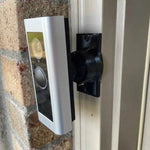


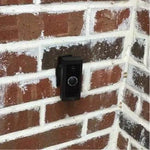
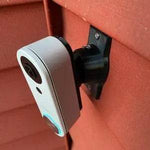
Custom 0-35° Swivel Mount — Blink Video Doorbell (2nd Gen, 2025)
Engineered for the new Blink Video Doorbell (2nd Gen, 2025) — the chunkier square-bodied refresh with 1440p HD, a 1:1 head-to-toe field of view, and three lithium batteries that run up to two years. The bracket cups the 2nd Gen's deeper rear housing precisely (it's noticeably thicker than the 1st Gen) and the smooth 0-35° ball joint lets you swing the head-to-toe frame to wherever it actually needs to point. Locks with stainless set screws. Outdoor-rated PETG, set-screw locked, made-to-order in our USA shop.
Custom-Fit for the Blink Video Doorbell (2nd Gen, 2025)
This bracket is shaped specifically for the Blink Video Doorbell (2nd Gen) released in 2025 — Amazon ASIN B0DGQVF47B (white). Blink's redesigned doorbell with 1440 × 1440 square HD, 150° horizontal × 150° vertical FOV (true head-to-toe), upgraded HD infrared night vision, three lithium batteries (up to 2-year life), and pricing at $69.99.
Does NOT fit: the original Blink Video Doorbell (1st Gen, 2021 — 16:9 widescreen body). The 2nd Gen is much thicker and square — completely different mounting geometry. Use our Blink 1st Gen mount for the original model. Also does not fit Ring, Nest, Wyze, Eufy, or any other brand.
Confused which Blink you have? The 2nd Gen has a square (1:1) lens housing and is noticeably chunkier; the 1st Gen is wider than tall. Send us a photo if you're unsure.
1440p Square Means Head-to-Toe — If You're Pointed at the Right Toes
The 2nd Gen's headline upgrade is the new 1:1 aspect with 150° vertical FOV — you can actually see whether someone's holding a package, kicking the welcome mat, or putting a foot up on the door frame. None of that detail helps if the camera is mounted on a wall that's offset from the door, because half the head-to-toe frame ends up watching brick.
This 0-35° dual-axis swivel mount tilts and pans the 2nd Gen body so the square frame actually covers the porch — top to bottom, left to right. Lock the angle with set screws and forget it; the 2-year battery life means you're not adjusting it again any time soon.
Two-Axis Aiming, 0-35° Range
One smooth ball joint. Aim left, right, up, or down — all the way to 35° in any direction. Lock the angle with set screws. Done.

Internal Wire Routing — Hidden & Protected
Low-voltage wires enter from the wall, pass through the hidden internal channel inside the ball-joint mount, route through the front adapter, and connect directly to the doorbell terminals. No exposed wiring, no weather risk.

Mount Dimensions
- Base Width: 1.8 inches
- Base Height: 3.1 inches
- Hole Spacing: 2-5/8 inches center-to-center
- Wall Extension at 0°: ~1.5 inches (low-profile)
- Narrow 3/4" baseplate option available for thin trim — see Customization below.
What You Get
- Custom Bracket for Blink 2nd Gen: Snug pocket — accommodates the chunky new body, no rattle.
- Dual-Axis 0-35° Swivel: Vertical and horizontal aim — full 1:1 frame stays usable.
- Battery Door Accessible: Designed so the 3-battery compartment opens without unmounting the doorbell from the wall.
- Wire Pass-Through: Routes existing chime wires through the joint if you're hardwiring (optional — the 2nd Gen is battery-first).
- Outdoor-Rated PETG: UV-stable, freeze-tolerant, weather-sealed.
- Siding Compatible: Flat surfaces and lapped siding up to 1.8" wide.
- Future-Proof Base: Universal swivel — switch brands later by ordering a ~$10 replacement adapter only.
Installing on the Blink Video Doorbell (2nd Gen)
-
Insert the 3 Lithium Batteries: The 2nd Gen ships with three lithium AA-equivalent batteries — install them before mounting so you can verify Live View aim.
Use the batteries Blink ships with (or replace with quality lithium). Standard alkalines won't last and don't deliver enough current for the radio in cold weather.
- Mount the Base: Position vertical or horizontal on your siding/trim. Drill pilot holes if needed and screw in with #6 screws (PH2 driver). Anchors as needed.
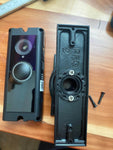
- Attach the Swivel: Screw the swivel onto the base with four #4 / PH1 center screws.
- Pair the Doorbell: Open the Blink Home Monitor app, add the 2nd Gen, optionally pair to a Sync Module Core for on-demand Live View.
- Snap the Blink In: Use the screws PROVIDED WITH THIS MOUNT (PH1 driver) — not Blink's anti-theft screws or stock plate.
- Aim & Lock: Open Live View in the app (requires Sync Module for on-demand, or trigger via doorbell press), tilt the swivel until the 1:1 frame covers porch top-to-bottom, then tighten the set screws.
- Sync Module Setup: If you bought the Sync Module Core bundle, place it inside near a power outlet and pair to your Wi-Fi.
Note: the Sync Module Core (newer, included in some bundles) does NOT support local USB storage. The older Sync Module 2 does. If local storage matters to you, get the Sync Module 2 separately.
Questions About Fitment?
- Email: shop@doorbellmount.com
- Text/Call: 1-833-326-6868
Standard Color: Ships in Black. Other colors via Color Change Request.
Need to Buy Your Blink Doorbell?
Quick affiliate links to current and previous Blink doorbell models:
- Blink Video Doorbell (2nd Gen, 2025) — B0DGQVF47B
- Blink Video Doorbell (1st Gen, 2021) — B08SG2MS3V
- Blink Sync Modules & Accessories on Amazon →
- Browse all Blink doorbells on Amazon →
Affiliate Disclosure: As an Amazon Associate, DoorbellMount.com earns from qualifying purchases at no extra cost to you. Pricing is controlled by Amazon and may change.
Angle Note: The 35° maximum is approximate; actual range varies slightly by surface and orientation.
3D-Printed Parts: Minor visible layer lines are normal and do not affect strength. Each mount is printed-to-order in our USA shop.
Don't waste 1440p head-to-toe on a bad angle — order the dedicated 2nd Gen swivel today.


