


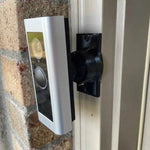
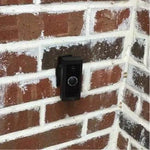
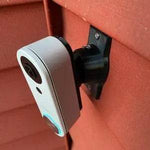
0-35° Swivel Mount for the Aqara Doorbell Camera G400 (Wired)
Engineered for the Aqara Doorbell Camera G400 Wired — the 2K head-to-toe model with PoE or 8-24V hardwired install, Wi-Fi 6 (2.4 + 5 GHz), HomeKit Secure Video, and 24/7 continuous recording. The bracket cradles the G400's tall 3:4 body so the head-to-toe view stays usable, and the dual-axis ball joint lets you tilt and pan up to 35° in any direction. Wire pass-through is sized for either standard doorbell wires OR terminated CAT5e/CAT6 with intact RJ45. Outdoor PETG, set-screw locked, made-to-order in the USA.
Custom-Fit for the Aqara G400 Wired (PoE / Hardwired)
This bracket is shaped specifically for the Aqara Doorbell Camera G400 (Wired) — Amazon ASIN B0G52BVRLQ (chime included). Aqara's premium 2025 wired doorbell with 2K 1536×2048 head-to-toe video (3:4 aspect), 165° FOV, dual-band Wi-Fi 6 (2.4/5 GHz), HomeKit Secure Video, 24/7 local recording (microSD), local AI detection, IP65 rating, and dual power: PoE OR 8-24V AC/DC chime wiring.
Does NOT fit: the Aqara Video Doorbell G4 (older 1080p model with battery option) or the Aqara G410 (2K + Matter hub, different body, battery-capable). Each has a unique footprint and a dedicated mount listing. Also does not fit Ring, Nest, Wyze, Eufy, or any non-Aqara brand.
Confused which Aqara you have? The G400 Wired is hardwire-only (no batteries) and prominently marketed as 2K with Wi-Fi 6 and PoE. If yours has a battery compartment, it's a G4 or G410 — different mount.
2K Head-to-Toe Wired = Top of Aqara's Lineup
The G400 Wired is what you buy when you want a doorbell that just works without subscription drama: 2K continuous recording locally to microSD, HomeKit Secure Video for off-site backup, Wi-Fi 6 to keep the network from being a bottleneck, and dual power options so you can run it off a PoE switch or your existing doorbell transformer.
None of that helps if the camera is pointed at the wrong wall. The 3:4 vertical aspect on the G400 is great for catching packages on the doorstep — but only when you can tilt and pan to where the doorstep actually is. This 0-35° dual-axis mount handles both axes and locks the angle permanently with set screws.
Two-Axis Aiming, 0-35° Range
One smooth ball joint. Aim left, right, up, or down — all the way to 35° in any direction. Lock the angle with set screws. Done.

Internal Wire Routing — Hidden & Protected
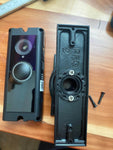
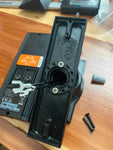
Low-voltage wires enter from the wall, pass through the hidden internal channel inside the ball-joint mount, route through the front adapter, and connect directly to the doorbell terminals. No exposed wiring, no weather risk.

Mount Dimensions
- Base Width: 1.8 inches
- Base Height: 3.1 inches
- Hole Spacing: 2-5/8 inches center-to-center
- Wall Extension at 0°: ~1.5 inches (low-profile)
- Narrow 3/4" baseplate option available for thin trim — see Customization below.
What You Get
- Custom Bracket for Aqara G400: Pre-shaped pocket fits the tall 3:4 body — flush, no rattle.
- Dual-Axis 0-35° Swivel: Tilt up/down and pan left/right — keep the head-to-toe frame on target.
- Wire Pass-Through (Both Sizes): Routes either standard doorbell wires OR a CAT5e/CAT6 with intact RJ45 (PoE setup).
- microSD Slot Stays Accessible: Designed so you can pull/swap the microSD card without unmounting.
- Outdoor-Rated PETG: Matches the G400's IP65 rating.
- Siding Compatible: Flat surfaces and lapped siding up to 1.8" wide.
- Universal Base: Future-proof — switch doorbells later for a ~$10 adapter swap.
Installing on the Aqara G400 (Wired)
-
Pick Power Mode: PoE (run a CAT5e/CAT6 from your switch/injector) OR 8-24V AC/DC doorbell wiring. If using existing chime power, turn the breaker off first.
PoE setup: confirm your switch or injector outputs at least standard PoE (802.3af, 15.4W). The G400 doesn't need PoE+. If using chime wiring: 8-12V works but 16-24V is recommended for fastest power-on and Wi-Fi 6 streaming.
- Pre-Stage the Cable: Pull and terminate the CAT5e (PoE) or run the doorbell wires to the install location. Test continuity before mounting.
- Mount the Base: Pull wires through, position vertical or horizontal on siding/trim, secure with #6 screws (PH2 driver). Anchors as needed.
- Attach the Swivel: Route the wires/Ethernet through the swivel center, attach to the base with four #4 / PH1 center screws.
- Connect & Mount the G400: Plug in PoE OR connect the two transformer leads. Snap the G400 onto the bracket using the screws PROVIDED WITH THIS MOUNT (PH1 driver) — not Aqara's stock plate.
- Pair via Aqara Home + HomeKit: Scan the HomeKit QR code with the Home app, add to your network via 5GHz Wi-Fi 6 if available. Insert microSD card before final mount if you want 24/7 local recording.
- Aim & Lock: Live View → adjust the swivel until the 3:4 head-to-toe frame covers porch top-to-bottom (packages visible at the bottom edge) → tighten set screws.
HomeKit caveat: when added to Apple Home, video resolution drops below 1080p inside Home app — 2K is only available within the Aqara Home app. Plan accordingly if you do all viewing through HomeKit.
Questions About Fitment?
- Email: shop@doorbellmount.com
- Text/Call: 1-833-326-6868
Standard Color: Ships in Black. Other colors via Color Change Request.
Need to Buy Your Aqara Doorbell?
Quick affiliate links to the Aqara doorbell lineup:
- Aqara Doorbell Camera Hub G410 (2K + Matter Hub + mmWave radar) — B0F6CJF9M9
- Aqara Doorbell Camera G400 Wired (2K 3:4, PoE/Hardwired, Wi-Fi 6) — B0G52BVRLQ
- Aqara Video Doorbell G4 (1080p, 6 AA Battery or Wired) — B0BPHTL7MG
- Browse all Aqara doorbells on Amazon →
Affiliate Disclosure: As an Amazon Associate, DoorbellMount.com earns from qualifying purchases at no extra cost to you. Pricing is controlled by Amazon and may change.
Angle Note: The 35° maximum is approximate; actual range varies slightly by surface and orientation.
3D-Printed Parts: Minor visible layer lines are normal and do not affect strength. Each mount is printed-to-order in our USA shop.
Get the G400's 2K head-to-toe view on target — order the dedicated mount today.


