


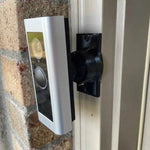
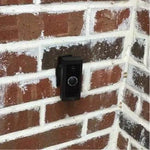
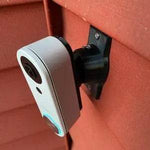
0-35° Adjustable Mount for the Alarm.com / SkyBell HD Legacy Video Doorbell
Built for the original Alarm.com SkyBell HD video doorbell family — the legacy round/cylindrical Alarm.com doorbell installed by dealers (Brinks, Monitronics, COPS, ADT-affiliate) before the VDB-750/770/755P/780B generation arrived in 2019-2021. 1080p HD video, 180° field of view, IR night vision, two-way audio, full Alarm.com platform integration. The bracket cradles the round legacy SkyBell HD body specifically and the 0-35° dual-axis ball joint aims the wide frame in any direction. Outdoor PETG, made-to-order in the USA.
Custom-Fit for the Legacy Alarm.com / SkyBell HD Doorbell
This bracket is shaped specifically for the original SkyBell HD-based Alarm.com video doorbell (also sold as the SkyBell HD Trim Plus) — the legacy round-faced Alarm.com doorbell that pre-dated the VDB-750/770/755P/780B numbered series. Used widely by Alarm.com dealers (Brinks, Monitronics, COPS, ADT-affiliate, Vivint pre-2018) from ~2015 through ~2020. 1080p HD video, 180° diagonal field of view, IR night vision, two-way audio, integrated chime, full Alarm.com platform integration. Wired-only operation: requires existing 16-24V AC doorbell wiring + active Alarm.com service plan.
Does NOT fit: the modern Alarm.com VDB-750, VDB-755P, VDB-770, or VDB-780B (all newer body shapes — see our separate listings for each). Each Alarm.com doorbell generation has its own dedicated mount.
Confused which Alarm.com doorbell you have? The legacy SkyBell-based model has a more cylindrical/rounded body with a centered round lens, was installed before 2020 in most cases, and the back has a SkyBell HD logo or model number. If yours has model number "ADC-VDB-XXX" prominently displayed, you have a newer model — see the matching VDB listing instead.
The Alarm.com Doorbell That Started It All — Aim It Right
The original SkyBell HD was the foundation of the Alarm.com doorbell ecosystem before Alarm.com brought their own VDB-series in-house. If your alarm dealer installed a doorbell between 2015-2020, this is probably what you have on the wall. Still works fine through the Alarm.com app and central station — no need to upgrade unless you're refreshing your full Alarm.com setup.
This 0-35° dual-axis swivel mount rotates the legacy SkyBell HD in any direction up to 35°, locks permanently with set screws, and routes the existing 16-24V wires cleanly through the joint. Locked aim is essential for pro-monitored installs — drift can register as a tamper event with your Alarm.com central station.
Two-Axis Aiming, 0-35° Range
One smooth ball joint. Aim left, right, up, or down — all the way to 35° in any direction. Lock with set screws.

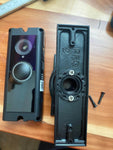
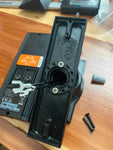
Internal Wire Routing — Hidden & Protected
Low-voltage wires enter from the wall, pass through the hidden internal channel inside the ball-joint mount, route through the front adapter, and connect directly to the doorbell terminals.

Mount Dimensions
- Base Width: 1.8 inches
- Base Height: 3.1 inches
- Hole Spacing: 2-5/8 inches center-to-center
- Wall Extension at 0°: ~1.5 inches (low-profile)
What You Get
- Custom Bracket for Legacy Alarm.com: Pre-shaped pocket fits the round/cylindrical SkyBell-based body — flush, no rattle.
- Dual-Axis 0-35° Swivel: Aim the 180° 1080p frame precisely; lock with set screws.
- Wire Pass-Through: Routes 16-24V AC doorbell wires through the joint cleanly.
- Outdoor-Rated PETG: UV-stable, freeze-tolerant.
- Universal Base: Future-proof — switch doorbells later for a ~$10 adapter swap.
- Pro-Monitoring Friendly: Locked set screws prevent aim drift / central-station tamper false-alerts.
Installing on the Legacy Alarm.com / SkyBell HD Doorbell
- Coordinate With Your Alarm Dealer: Pro-monitored installs: call your dealer for a 1-hour test mode before swapping the doorbell.
-
Power Down:Turn the breaker off at the chime circuit. Verify with a tester at the existing wires before pulling them through the mount.
- Verify Wiring: 16-24V AC, 10VA-min transformer required.
- Mount the Base: Pull the wires through the swivel base, position vertical or horizontal, secure with #6 screws (PH2 driver).
- Attach the Swivel: Route wires through the swivel center, attach with four #4 / PH1 center screws.
- Connect & Mount the Doorbell: Connect doorbell-circuit wires to the screw terminals. Snap onto the bracket using the screws PROVIDED WITH THIS MOUNT (PH1 driver) — not the original stock plate.
- Pair via Alarm.com: Restore power. Your dealer can re-pair the doorbell to your Alarm.com account remotely.
- Aim & Lock: Live View in the Alarm.com app → adjust the swivel → tighten set screws.
- Confirm Pro-Monitoring: Take the panel out of test mode with your dealer.
Upgrade tip: legacy SkyBell HD-based doorbells are still supported by the Alarm.com platform but are getting long in the tooth — you may notice slow live view loads and dropouts. The newer VDB-770 (head-to-toe portrait) or VDB-780B (battery) are cleaner upgrades and integrate with the same Alarm.com service. Keep this swivel base on the wall and swap the front bracket adapter for ~$10 when you upgrade.
Questions About Fitment?
- Email: shop@doorbellmount.com
- Text/Call: 1-833-326-6868
Standard Color: Black or White.
Need to Buy Your Alarm.com Doorbell?
The legacy SkyBell HD model is generally end-of-life. For new installs, get the modern Alarm.com lineup:
- Alarm.com VDB-770 — Head-to-Toe wired — B08R6JB5KR
- Alarm.com VDB-750 — B0CFJSH5V7
- Alarm.com VDB-780B Battery — B0C9YRN44H
- Browse all Alarm.com doorbells on Amazon →
Affiliate Disclosure: As an Amazon Associate, DoorbellMount.com earns from qualifying purchases at no extra cost to you.
Angle Note: The 35° maximum is approximate; actual range varies slightly by surface and orientation.
3D-Printed Parts: Minor visible layer lines are normal and do not affect strength. Each mount is printed-to-order in our USA shop.
Aim your legacy Alarm.com doorbell at the right spot — order the dedicated mount today.


