


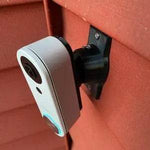
0-35° Adjustable Mount for the Alarm.com ADC-VDB750 Video Doorbell
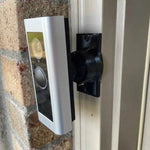
Built for the Alarm.com ADC-VDB750 — Alarm.com's Design Studio Series wired doorbell with 1080p HDR video, 165° horizontal × 145° vertical field of view, dual Wi-Fi antenna for improved range, IR night vision, two-way audio, and a sleek finish in black or white. The standard ADC-VDB750 is the everyday-install model for many Alarm.com dealers (Brinks, Monitronics, COPS, ADT-affiliate). The bracket cradles the VDB750 body specifically (different from VDB770/VDB780B/VDB755P) and the 0-35° dual-axis ball joint aims the wide frame in any direction. Outdoor PETG, made-to-order in the USA.
Custom-Fit for the Alarm.com ADC-VDB750
This bracket is shaped specifically for the Alarm.com ADC-VDB750 Wi-Fi Video Doorbell Camera — Amazon ASINs B0CFJSH5V7 and B0CZ7PQ17Z (Design Studio Series, Black/White finish). Alarm.com's most-installed dealer doorbell with: 2MP / 1080p Full HD video, 165° horizontal × 145° vertical field of view, HDR, IR night vision, dual Wi-Fi antenna for improved range, two-way audio, integrated chime, package detection analytics. Wired-only operation: requires existing 16-24V AC doorbell wiring + active Alarm.com service plan via your dealer.
Does NOT fit: the VDB-770 (slim head-to-toe portrait body), VDB-755P PoE Pro Station (chunkier with Ethernet), VDB-780B Battery, or any non-Alarm.com doorbell. Each Alarm.com doorbell has its own dedicated mount.
Confused which Alarm.com doorbell you have? The VDB-750 has a more square/horizontal lens face (wider than tall), 1080p video (not the head-to-toe 1440×1920 of the 770), and was the dealer-default mid-2010s through 2021 before the 770 launched. If yours has a portrait/vertical lens, that's a 770. If it has a battery compartment, that's a 780B.
The Alarm.com Workhorse Doorbell — Aim It Right
The VDB-750 is the everyday Alarm.com doorbell — the one your dealer probably installed if you signed up before 2022. Solid 1080p, dual Wi-Fi antenna for tricky porch installs, and tight integration with the Alarm.com central station and panel. The 165° horizontal view catches a lot, but only when aimed correctly.
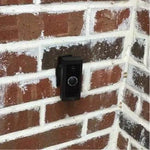
This 0-35° dual-axis swivel mount rotates the VDB-750 in any direction up to 35°, locks permanently with set screws, and routes the existing 16-24V wires cleanly through the joint. Locked aim is essential for pro-monitored installs — drift can register as a tamper event with your central station.
Two-Axis Aiming, 0-35° Range
One smooth ball joint. Aim left, right, up, or down — all the way to 35° in any direction. Lock the angle with set screws. Done.

Internal Wire Routing — Hidden & Protected
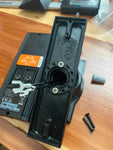
Low-voltage wires enter from the wall, pass through the hidden internal channel inside the ball-joint mount, route through the front adapter, and connect directly to the doorbell terminals.

Mount Dimensions
- Base Width: 1.8 inches
- Base Height: 3.1 inches
- Hole Spacing: 2-5/8 inches center-to-center
- Wall Extension at 0°: ~1.5 inches (low-profile)
What You Get
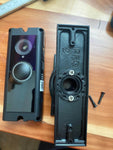
- Custom Bracket for VDB-750: Pre-shaped pocket fits the VDB-750 body — flush, no rattle, no obstruction of the lens, mic, or speaker.
- Dual-Axis 0-35° Swivel: Aim the 165° H × 145° V 1080p frame precisely; lock with set screws.
- Wire Pass-Through: Routes 16-24V AC doorbell wires through the joint cleanly.
- Outdoor-Rated PETG: UV-stable, freeze-tolerant.
- Universal Base: Future-proof — switch doorbells later for a ~$10 adapter swap.
- Pro-Monitoring Friendly: Locked set screws prevent aim drift / central-station tamper false-alerts.
Installing on the Alarm.com VDB-750
- Coordinate With Your Alarm Dealer: Pro-monitored installs: call your dealer (Brinks/Monitronics/etc) for a 1-hour test mode before swapping the doorbell.
-
Power Down:Turn the breaker off at the chime circuit. Verify with a tester at the existing wires before pulling them through the mount.
- Verify Wiring: 16-24V AC, 10VA-min transformer required.
- Mount the Base: Pull the wires through the swivel base, position vertical or horizontal on your siding/trim, secure with #6 screws (PH2 driver). Anchors as needed.
- Attach the Swivel: Route wires through the swivel center, attach with four #4 / PH1 center screws.
- Connect & Mount the VDB-750: Connect doorbell-circuit wires to the VDB-750 terminals. Snap onto the bracket using the screws PROVIDED WITH THIS MOUNT (PH1 driver) — not Alarm.com's stock plate.
- Pair via Alarm.com / Customer Site: Restore power. Your dealer can re-pair the doorbell to your Alarm.com account remotely.
- Aim & Lock: Live View in the Alarm.com app → adjust the swivel until the 165° frame covers the porch top-to-bottom → tighten set screws.
- Confirm Pro-Monitoring: Take the panel out of test mode with your dealer.
Service tip: like all Alarm.com doorbells, the VDB-750 needs an active service plan to function. The Wi-Fi range can be tricky on stucco/brick homes — that's exactly what the dual antenna is designed for. Check the signal strength in the Alarm.com app after mounting, ideally above -65 dBm.
Questions About Fitment?
- Email: shop@doorbellmount.com
- Text/Call: 1-833-326-6868
Standard Color: Black or White. Color Change Request for other shades.
Need to Buy Your Alarm.com Doorbell?
- Alarm.com ADC-VDB750 — 165° H × 145° V — B0CFJSH5V7
- Alarm.com ADC-VDB770 — Head-to-Toe — B08R6JB5KR
- Alarm.com ADC-VDB780B — Battery — B0C9YRN44H
- Browse all Alarm.com doorbells on Amazon →
Affiliate Disclosure: As an Amazon Associate, DoorbellMount.com earns from qualifying purchases at no extra cost to you.
Angle Note: The 35° maximum is approximate; actual range varies slightly by surface and orientation.
3D-Printed Parts: Minor visible layer lines are normal and do not affect strength. Each mount is printed-to-order in our USA shop.
Aim your Alarm.com VDB-750 at the right spot — order the dedicated mount today.


