




0-35° Adjustable Swivel Mount for the Tapo Doorbell Pro D260 4K Video Doorbell (Wired or Battery, 2026) — Aim the 180° View Where It Counts
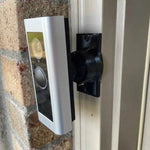
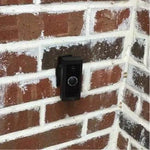
The Tapo Doorbell Pro D260 records in 4K with a 180° head-to-toe view — but only of whatever its flat wall happens to face. This 0-35° Adjustable Swivel Mount lets you tilt the D260 down toward the porch floor for packages, or turn it left or right toward the walkway, then lock the ball joint so it stays put.
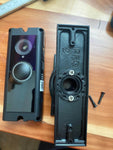
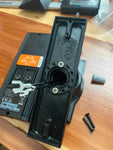
The swivel head ships with a bracket printed specifically for the Tapo D260 body. It replaces the bracket and tilt wedges in the Tapo box, so the doorbell clicks on exactly like it would on the stock plate.
Printed to order in the USA from UV-stable PETG. Covered by our Replacement Guarantee; free shipping over $100. More about the doorbell on TP-Link's Tapo D260 page.
Which Tapo Doorbell This 0-35° Swivel Fits
Select TP-Link Tapo D260 in the Doorbell Model menu. The bracket is matched to this doorbell only.
- Tapo Doorbell Pro D260 (2026) — TP-Link's first 4K doorbell: 180° diagonal head-to-toe view, radar plus PIR motion sensing, color night vision, and local microSD storage (up to 512 GB) with no subscription required. Runs on its rechargeable battery (rated up to 180 days) or hardwired to 8-24V AC. IP66 weather rating, dual-band 2.4/5 GHz Wi-Fi. Body size about 5.73 × 2.57 × 1.42 inches. Buy on Amazon → · Specs at Tapo.com →
Important: This bracket is cut for the D260 body only. It does not fit the Tapo D130, D205, D210, D225, D230 or D235 — those use their own brackets, which you will find in our Tapo doorbell mounts collection.
Not 100% sure which Tapo you own? Use the photo upload option on this listing and we confirm before anything ships.
0-35° Adjustable Swivel Mount Specs
- Base Width: 1.8 inches (standard) — narrow 3/4-inch base available on request
- Base Height: 3.1 inches
- Adjustment: 0-35° horizontal and vertical, lockable ball joint
- Material: UV-stable PETG, 3D-printed in the USA, freeze-tolerant
- Hardware: 2× #6 wall screws + the Tapo D260 bracket with its mounting screws
- Price: $45.00
Key Features & Benefits
- Two-Axis Aim: Up to 35° left, right, up or down — point the 4K camera at the steps, not the street.
- Locks Solid: Tighten the ball joint once; door slams and wind don't move it.
- Hidden Wiring: Hardwired installs route the wires through the mount body.
- Made for the D260: Bracket printed for the Tapo Doorbell Pro — nothing to shim or adapt.
- Outdoor PETG: UV-stable, freeze-tolerant, 3D-printed in the USA.
Want to read more about angling a doorbell? See Achieve Wider Coverage With Angle Mounts and How High Do You Mount a Video Doorbell.
Installing Your 0-35° Swivel Mount on a Tapo D260
- Select the model: Choose TP-Link Tapo D260 in the dropdown so the swivel ships with the right bracket.
- Set the doorbell aside: If the D260 is already installed, release it from the Tapo bracket per the Tapo quick-start guide. For a hardwired install, switch off the breaker and disconnect the two wires.
- Mount the base: Run the wires through the base (skip this if you're on battery), set it on the wall, and drive the provided #6 wood screws with a #2 Phillips screwdriver. Pilot holes help on hardwood or Hardie.
- Aim and lock: Tilt the ball joint 0-35° toward the walkway or down toward the step, then tighten.
- Attach the D260 bracket: Fasten the Tapo bracket to the swivel head with the small center screws. Use a #1 Phillips PRECISION screwdriver.
- Mount the doorbell: Connect the wires to the D260 terminals (hardwired only) and seat the doorbell on the bracket with the screws PROVIDED WITH THIS MOUNT — set Tapo's plate and wedges aside.
- Finish up: Restore power or press the D260 power button, open Live View in the Tapo app, and fine-tune the angle before the final tightening.
Tools: #2 Phillips screwdriver, #1 Phillips PRECISION screwdriver, drill (optional pilot holes), level. Multimeter only if you hardwire.
FAQ — 0-35° Adjustable Swivel Mount for the Tapo D260
✔ Replacement Guarantee — Photos Reviewed Before Shipping
Send photos of your Tapo D260 and the spot where it mounts through the photo upload option on this listing. We review every one before your swivel ships, which is how we guarantee the fit.
- Before it ships: Attach photos of your doorbell and mounting spot with the photo upload option on this listing.
- Help is a text away: 1-833-326-6868, or email shop@doorbellmount.com.
Buying the Doorbell or Tools?
Tapo doorbell:
- Tapo Doorbell Pro D260 4K Video Doorbell (2026) — ASIN B0GYC5HJ2R on Amazon
- Tapo D260 product page and spec sheet at Tapo.com
Install tools & supplies:
- #1 Phillips PRECISION screwdriver — for the #4 bracket screws
- #2 Phillips screwdriver — for the #6 wall screws
- 16-24V AC doorbell transformer — if you hardwire the D260 and your old transformer is weak
Affiliate Disclosure: As an Amazon Associate, DoorbellMount.com earns from qualifying purchases at no extra cost to you. These small commissions help fund development of new mounts and brackets.
Questions About Aiming a Tapo D260?
Upload photos with the photo upload option on this listing, or reach us directly:
- Email: shop@doorbellmount.com
- Text/Call: 1-833-326-6868
Color: Standard color is Black; select a different color in the color options on this page.
Tapo and TP-Link are trademarks of TP-Link Corporation. DoorbellMount.com is an independent manufacturer and is not affiliated with or endorsed by TP-Link. The doorbell is not included.
Order your 0-35° Swivel Mount for the Tapo Doorbell Pro D260 today — two-axis aim and lock, hidden wiring, bracket printed for the D260, photo-checked before shipping at DoorbellMount.com.