




0-35° Adjustable Swivel Mount for the Wyze Video Doorbell v2
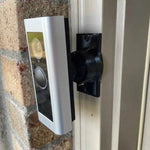
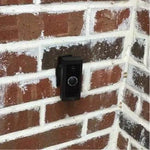
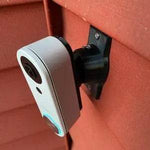
A 3D-printed swivel mount custom-fit to the Wyze Video Doorbell v2 — Wyze's affordable 2K wired doorbell with a head-to-toe 166° field of view. The bracket pockets the v2's slim rectangular body so it sits flush against your trim or siding, and the dual-axis ball joint lets you fine-tune the camera angle in any direction up to 35°. Lock the angle permanently with stainless set screws. Heavy-walled UV-stable PETG, set-screw locked, and ships in matte black. Made-to-order in the USA.
Custom-Fit for the Wyze Video Doorbell v2
This bracket is shaped specifically for the Wyze Video Doorbell v2 — Amazon ASIN B0C896D28H. Wyze's 2023-released wired 2K doorbell with 1440 × 1440 head-to-toe view, 166.8° FOV, microSD storage up to 256GB, and works with most existing mechanical chimes (16-24V AC).
Does NOT fit: the original Wyze Video Doorbell v1 (1080p, 3:4 aspect — different body), the Wyze Video Doorbell Pro (battery-powered, square body), the Wyze Duo Cam Doorbell, or any non-Wyze brand. Each model has its own dedicated mount listing.
Confused which Wyze doorbell you have? The v2 has a slim portrait shape with the 2K head-to-toe lens at top. Send us a photo if you're unsure.
Why a Swivel Beats Wyze's Stock Wedges
The v2 ships with a small horizontal-tilt wedge in the box — usable, but it's a single fixed angle and only adjusts in one axis. If your wall is offset from the door, or your visitors approach from the side, that's not enough.
This 0-35° dual-axis swivel mount covers any combination of horizontal and vertical adjustment up to 35°, then locks the angle with set screws so it stays. The 2K head-to-toe FOV is wasted if you can't aim it right — this mount fixes that without spending more than the doorbell itself cost.
Two-Axis Aiming, 0-35° Range
One smooth ball joint. Aim left, right, up, or down — all the way to 35° in any direction. Lock the angle with set screws. Done.

Internal Wire Routing — Hidden & Protected
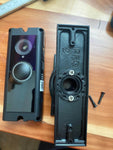
Low-voltage wires enter from the wall, pass through the hidden internal channel inside the ball-joint mount, route through the front adapter, and connect directly to the doorbell terminals. No exposed wiring, no weather risk.

Mount Dimensions
- Base Width: 1.8 inches
- Base Height: 3.1 inches
- Hole Spacing: 2-5/8 inches center-to-center
- Wall Extension at 0°: ~1.5 inches (low-profile)
- Narrow 3/4" baseplate option available for thin trim — see Customization below.
What You Get
- Custom Bracket for Wyze v2: Pre-shaped pocket — snug fit, no rattle.
- Dual-Axis 0-35° Swivel: Tilt up/down and pan left/right; lock with set screws.
- Wire Pass-Through: Routes the existing 16-24V chime wires cleanly through the joint.
- microSD Slot Stays Accessible: Designed so the side-edge microSD slot is still reachable without dismounting.
- Outdoor-Rated PETG: UV-stable filament, IP65 rating doesn't matter if the doorbell is rained on, but the mount holds up too.
- Siding Compatible: Flat surfaces and lapped siding up to 1.8" wide.
- Future-Proof Base: Universal swivel — swap to a different doorbell brand later by ordering a ~$10 replacement adapter.
Installing on the Wyze Video Doorbell v2
-
Power Off: Turn off the doorbell circuit at the breaker. The v2 is wired (16-24V AC) — no batteries.
Confirm the wires are dead with a multimeter before stripping. The Wyze v2 needs at least 16V AC at the doorbell location to chime properly.
- Mount the Base: Pull the doorbell wires through, position the base vertically or horizontally on your siding/trim, then screw into the wall with #6 screws (PH2 driver). Anchors if not into a stud.
- Attach the Swivel: Route the wires through the swivel center, screw onto the base with four #4 / PH1 center screws.
- Wire the Doorbell: Connect the two transformer leads to the back of the v2. Polarity doesn't matter for AC.
- Snap In the Doorbell: Use the screws PROVIDED WITH THIS MOUNT (PH1 driver) — not Wyze's wedge plate or stock screws.
- Aim & Lock: Restore power, open the Wyze app, switch to Live View, fine-tune the angle so the head-to-toe frame covers your porch correctly, then tighten the set screws.
Tip: install a microSD card before mounting (the slot is on the side of the v2). It's much easier to swap when the doorbell is in your hand than reach up after mounting.
Questions About Fitment?
- Email: shop@doorbellmount.com
- Text/Call: 1-833-326-6868
Standard Color: Ships in Black. Other colors via Color Change Request.
Need to Buy Your Wyze Doorbell?
Quick affiliate links to the Wyze video doorbell lineup:
- Wyze Video Doorbell v2 (2K Wired, 2023) — B0C896D28H
- Wyze Wireless Video Doorbell Pro (1440p Battery)
- Wyze Wireless Duo Cam Doorbell (2K Dual Cam, Battery)
- Wyze Video Doorbell v1 (1080p Wired, 3:4 Aspect)
- Browse all Wyze doorbells on Amazon →
Affiliate Disclosure: As an Amazon Associate, DoorbellMount.com earns from qualifying purchases at no extra cost to you. Pricing is controlled by Amazon and may change.
Angle Note: The 35° maximum is approximate; actual range varies slightly by surface and orientation.
3D-Printed Parts: Minor visible layer lines are normal and do not affect strength. Each mount is printed-to-order in our USA shop.
Get the angle right on your Wyze v2 — order today and we'll print it within 24-48 hours.


