




0-35° Adjustable Mount for the Wyze Video Doorbell Pro (Wireless or Wired)
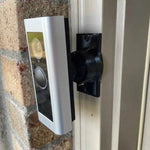
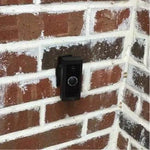
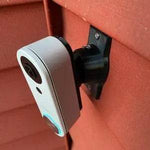
Built for the Wyze Video Doorbell Pro — the wireless or wired model with 1440p 1:1 head-to-toe video and a 6-month battery life. The bracket cups the Pro's chunkier square body without blocking the camera or the bottom-edge speaker grille, and the dual-axis ball joint lets you fine-tune the head-to-toe frame in two directions up to 35°. Locks with stainless set screws. Outdoor-rated PETG, made-to-order in the USA, ships matte black.
Custom-Fit for the Wyze Video Doorbell Pro
This bracket is shaped specifically for the Wyze Video Doorbell Pro — Amazon ASIN B0BQCW4W6C (chime included). Wyze's wireless 1:1 head-to-toe doorbell with 1440 HD video, color night vision, two-way audio, a built-in 6500mAh lithium battery (3-6 month life with normal use), and the option to wire to existing chime power for trickle-charging.
Does NOT fit: the Wyze Video Doorbell v1 or v2 (both wired-only, different bodies — see our v1 and v2 mount listings), the Wyze Duo Cam Doorbell (different dual-camera body), or any non-Wyze brand. Each Wyze model has its own dedicated mount.
Confused which Wyze you have? The Pro has a 1:1 square camera lens, runs on a built-in battery (no AAs), and is noticeably thicker than the v1/v2. If yours has a 3:4 portrait shape and runs on chime wires only, it's a v1 or v2.
Don't Aim a 1:1 Head-to-Toe Sensor at the Wrong Wall
The Pro's 1:1 aspect ratio means you see top-to-bottom — packages, doormat, visitor's face — without losing horizontal coverage. That's the whole pitch. But if the camera is fixed to a wall that's offset from the door, half the frame ends up watching brick or trim.
This 0-35° swivel mount tilts the entire body in two axes so the head-to-toe frame actually covers the porch. With the Pro's 6-month battery life, you set the angle once and forget it for half the year. Lock it with set screws, recharge twice a year (or wire to existing chime for trickle-charge), and that's it.
Two-Axis Aiming, 0-35° Range
One smooth ball joint. Aim left, right, up, or down — all the way to 35° in any direction. Lock the angle with set screws. Done.

Internal Wire Routing — Hidden & Protected
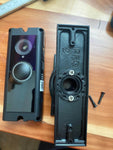
Low-voltage wires enter from the wall, pass through the hidden internal channel inside the ball-joint mount, route through the front adapter, and connect directly to the doorbell terminals. No exposed wiring, no weather risk.

Mount Dimensions
- Base Width: 1.8 inches
- Base Height: 3.1 inches
- Hole Spacing: 2-5/8 inches center-to-center
- Wall Extension at 0°: ~1.5 inches (low-profile)
- Narrow 3/4" baseplate option available for thin trim — see Customization below.
What You Get
- Custom Bracket for Wyze Pro: Pre-shaped pocket — fits the chunky 1:1 body, no rattle.
- Dual-Axis 0-35° Swivel: Aim the head-to-toe frame precisely; lock with set screws.
- USB-C Charging Port Accessible: Designed so the bottom USB-C port stays reachable for in-place charging without dismounting.
- Wire Pass-Through: Optional — if you're wiring to existing chime power for trickle-charging, the wires route cleanly through the joint.
- Outdoor-Rated PETG: UV-stable, freeze-tolerant, sealed against rain.
- Siding Compatible: Flat surfaces and lapped siding up to 1.8" wide.
- Universal Base: Future-proof — switch doorbells later for a ~$10 adapter swap.
Installing on the Wyze Video Doorbell Pro
-
Charge the Battery First: The Pro ships partially charged. Top it off via USB-C (about 5 hours from empty) so you can verify Live View aim during install.
If wiring to existing chime power for trickle-charge: turn the breaker off first. The Pro is happy with 16-24V AC at the doorbell location.
- Mount the Base: Pull wires through (if wiring to chime), position the base vertically or horizontally on your siding/trim, screw in with #6 screws (PH2 driver). Anchors if not into a stud.
- Attach the Swivel: Route wires through the swivel center (skip if battery-only), attach to base with four #4 / PH1 screws.
- Wire (or skip) the Doorbell: If wiring, connect the two transformer leads to the Pro's screw terminals — polarity doesn't matter. If battery-only, no wiring needed.
- Snap the Pro In: Use the screws PROVIDED WITH THIS MOUNT (PH1) — not Wyze's stock wedge plate or 3M adhesive method.
- Aim & Lock: Open the Wyze app → Live View → tilt and pan the swivel until the 1:1 frame covers porch top-to-bottom → tighten set screws.
- Pair Chime & Test: Plug in the included Wyze Chime Pro indoors near a power outlet, pair via the app, test the doorbell press.
Battery tip: charge the Pro at the start of spring and again at the start of fall — that gives you uninterrupted coverage all year. Or wire it to existing chime power for continuous trickle-charge.
Questions About Fitment?
- Email: shop@doorbellmount.com
- Text/Call: 1-833-326-6868
Standard Color: Ships in Black. Other colors via Color Change Request.
Need to Buy Your Wyze Doorbell?
Quick affiliate links to the full Wyze video doorbell lineup:
- Wyze Video Doorbell v2 (2K Wired, 2023) — B0C896D28H
- Wyze Wireless Video Doorbell Pro (1440p Battery + Chime) — B0BQCW4W6C
- Wyze Wireless Duo Cam Doorbell (2K Dual Cam, Battery) — B0DCJB43TH
- Wyze Video Doorbell v1 (1080p Wired, 3:4 Aspect) — B08WQ15B37
- Browse all Wyze doorbells on Amazon →
Affiliate Disclosure: As an Amazon Associate, DoorbellMount.com earns from qualifying purchases at no extra cost to you. Pricing is controlled by Amazon and may change.
Angle Note: The 35° maximum is approximate; actual range varies slightly by surface and orientation.
3D-Printed Parts: Minor visible layer lines are normal and do not affect strength. Each mount is printed-to-order in our USA shop.
Get the angle right on your Wyze Pro — order today.


