




0-35° Adjustable Swivel Mount — Aqara Video Doorbell G4
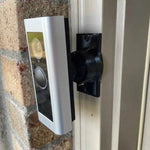
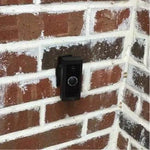
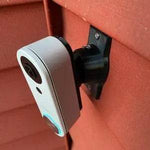
A 3D-printed swivel mount custom-fit to the Aqara Video Doorbell G4 — Aqara's HomeKit Secure Video doorbell with local face recognition, 1080p HD, 162° FOV, and the rare ability to run off six AA batteries OR existing chime wiring (your choice). The bracket cups the G4's distinctive curved body without blocking the lens or the infrared sensors, and the dual-axis ball joint gives you fine-tune control up to 35° in any direction. Locks with stainless set screws. Heavy-walled UV-stable PETG, ships matte black, made-to-order in the USA.
Custom-Fit for the Aqara Video Doorbell G4
This bracket is shaped specifically for the Aqara Video Doorbell G4 — Amazon ASIN B0BPHTL7MG (chime included). Aqara's first-generation HomeKit Secure Video doorbell with 1080p FHD, 162° FOV, infrared night vision, local AI face recognition, two-way audio, IFTTT support, and dual power options: six AA batteries (~4 month life) or hardwired to existing 12-24V doorbell chime wiring.
Does NOT fit: the newer Aqara G410 (2K, has Matter hub built-in — different body) or the Aqara G400 Wired (2K 3:4 head-to-toe, hardwired/PoE only, completely different shape). Also does not fit Ring, Nest, Wyze, Eufy, or any non-Aqara brand. Each Aqara model has its own dedicated mount listing.
Confused which Aqara you have? The G4 is the original (released 2023), takes 6 AA batteries, has a more rounded body. If yours has a Matter hub built in or 2K resolution on the box, it's a G400 or G410 — different mount.
HomeKit Secure Video Deserves the Right Aim
The G4 is one of the few HomeKit Secure Video doorbells that doesn't require a separate hub or subscription — Aqara handles the encryption, Apple stores the clips encrypted in iCloud. But all that privacy theater is wasted if the camera's pointed at the wrong wall. The G4's 162° FOV is wide, but a wide lens off-center still misses the visitor.
This 0-35° swivel mount tilts and pans up to 35° in either axis so the AI face recognition has a face to actually recognize. Lock with set screws and forget it. With AA batteries, you only revisit the install every ~4 months for fresh batteries — same time you'd want to verify the angle hasn't drifted.
Two-Axis Aiming, 0-35° Range
One smooth ball joint. Aim left, right, up, or down — all the way to 35° in any direction. Lock the angle with set screws. Done.

Internal Wire Routing — Hidden & Protected
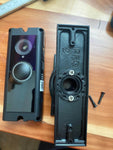
Low-voltage wires enter from the wall, pass through the hidden internal channel inside the ball-joint mount, route through the front adapter, and connect directly to the doorbell terminals. No exposed wiring, no weather risk.

Mount Dimensions
- Base Width: 1.8 inches
- Base Height: 3.1 inches
- Hole Spacing: 2-5/8 inches center-to-center
- Wall Extension at 0°: ~1.5 inches (low-profile)
- Narrow 3/4" baseplate option available for thin trim — see Customization below.
What You Get
- Custom Bracket for Aqara G4: Pre-shaped pocket fits the G4's curved body — flush, no rattle, no IR sensor obstruction.
- Dual-Axis 0-35° Swivel: Aim the 162° FOV precisely; lock with set screws.
- Battery Compartment Stays Accessible: Designed so the rear AA battery door is reachable for swaps without unmounting the doorbell.
- Wire Pass-Through: Optional — if you wire to existing chime power, the wires route cleanly through the joint.
- Outdoor-Rated PETG: UV-stable, freeze-tolerant, sealed against rain.
- Siding Compatible: Flat surfaces and lapped siding up to 1.8" wide.
- Universal Base: Future-proof — switch doorbells later for a ~$10 adapter swap.
Installing on the Aqara Video Doorbell G4
-
Pick Battery or Wired First: Decide upfront — if you're using the included 6 AA battery pack, no wiring needed. If hardwiring to existing chime power, turn the breaker off first.
If hardwiring: the G4 needs 12-24V AC at the chime. Verify with a multimeter before stripping wires.
- Mount the Base: Pull wires through (only if hardwiring), position base vertically or horizontally on your siding/trim, then screw in with #6 screws (PH2 driver). Anchors if not into a stud.
- Attach the Swivel: Route wires through the swivel center (skip if battery), then screw onto the base with four #4 / PH1 center screws.
- Insert Batteries (or Wire the Doorbell): If battery: install the 6 AA pack into the back of the G4 per Aqara's manual. If hardwiring: connect the two transformer leads to the G4's screw terminals.
- Snap the G4 In: Use the screws PROVIDED WITH THIS MOUNT (PH1 driver) — not Aqara's stock wedge plate or anti-theft screws.
- Pair with HomeKit + Aqara App: Open the Aqara Home app, scan the HomeKit QR on the back (if not already mounted), add to your home. The chime repeater plugs in indoors.
- Aim & Lock: Open Live View in the Home app or Aqara Home → tilt the swivel until the 162° frame covers porch — visitor face zone centered → tighten set screws.
Tip: enable Local Face Recognition in the Aqara Home app before mounting and add yourself as a Known Visitor. Once the angle is locked in, AI accuracy improves dramatically over the first week.
Questions About Fitment?
- Email: shop@doorbellmount.com
- Text/Call: 1-833-326-6868
Standard Color: Ships in Black. Other colors via Color Change Request.
Need to Buy Your Aqara Doorbell?
Quick affiliate links to the Aqara doorbell lineup:
- Aqara Doorbell Camera Hub G410 (2K + Matter Hub + mmWave radar) — B0F6CJF9M9
- Aqara Doorbell Camera G400 Wired (2K 3:4, PoE/Hardwired, Wi-Fi 6) — B0G52BVRLQ
- Aqara Video Doorbell G4 (1080p, 6 AA Battery or Wired) — B0BPHTL7MG
- Browse all Aqara doorbells on Amazon →
Affiliate Disclosure: As an Amazon Associate, DoorbellMount.com earns from qualifying purchases at no extra cost to you. Pricing is controlled by Amazon and may change.
Angle Note: The 35° maximum is approximate; actual range varies slightly by surface and orientation.
3D-Printed Parts: Minor visible layer lines are normal and do not affect strength. Each mount is printed-to-order in our USA shop.
Get HomeKit Secure Video on the right angle — order today.


