



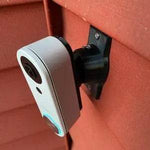
0-35° Swivel Mount for the Ring Wired Doorbell Pro (3rd Gen) — Built for 4K
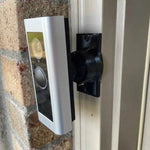
This 0-35° two-axis swivel mount is built for the doorbell whose 4K Retinal sensor and 10x zoom only pay off when the camera is pointed exactly at the action zone. The dual-axis ball joint gives you continuous angle control across a full 70° range (35° each direction), the doorbell-specific bracket pocket eliminates rocking and gaps, and the locking set screws hold the angle permanently — even after a kid slams the front door for the hundredth time. Outdoor-rated PETG body, complete hardware kit included, ships in matte black.
Custom Bracket for Ring's First True 4K Wired Doorbell
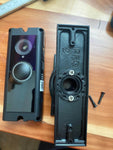
Engineered for the Ring Wired Doorbell Pro (3rd Gen) — Amazon ASIN B0F151GFYR, released October 2025 with Retinal 4K, 10x Enhanced Zoom, Low-Light Sight, WiFi 6, and 3D Motion Detection. Mounting footprint is different from the older Pro 2 (curved back) and the original Pro (flat with ridges).
Does NOT fit: the older Ring Pro 2 (curved back), the original Ring Pro (flat with ridges), the Wired Doorbell Plus 2nd Gen, or the Pro PoE variant. Same body as the PoE version but listed separately for SEO clarity.
Mixed up between Ring Pro generations? Send a photo of the back. We respond fast.
4K Means Detail — But Only If You're Aimed at What Matters
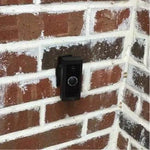
The Ring Pro 3rd Gen is the first Ring doorbell to record true 4K — enough resolution to read a license plate from across the street or recognize a delivery driver's face from 30 feet. Naturally, you don't want it pointed at the wrong wall. This swivel handles the most common install problem with a doorbell this premium: a side wall or recessed entry that pushes the camera off-axis.
0-35° Two-Axis Adjustment
Precision ball joint — tilt up to 35° in any direction, lock with set screws so the angle never drifts.

Internal Wire Routing — Hidden & Protected
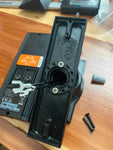
Low-voltage wires enter from the wall, pass through the hidden internal channel inside the ball-joint mount, route through the front adapter, and connect directly to the doorbell terminals. No exposed wiring, no weather risk.

Mount Dimensions
- Base Width: 1.8 inches
- Base Height: 3.1 inches
- Hole Spacing: 2-5/8 inches center-to-center
- Wall Extension at 0°: ~1.5 inches
Built for the Pro 3rd Gen
- Pro 3rd Gen-Specific Bracket: Pre-shaped to the new body — no rocking, no gap, no rattle.
- Two-Axis 0-35° Range: Get the full benefit of the 4K sensor's wide field of view.
- Locking Set Screws: Once you set the angle, it stays. No drift in cold weather.
- Wire Pass-Through Joint: Routes 16-24VAC transformer wires cleanly through the swivel.
- Outdoor PETG: Sun, rain, snow, salt air — handles them all.
- Universal Base Design: Future-proof — when Ring releases a Pro 4th Gen, just swap the small ~$10 adapter.
- Hardware Included: All required screws and anchors. PH1 + PH2 drivers cover everything.
Installing the 0-35° Mount with the Ring Pro 3rd Gen
-
Power Off: Cut power at the breaker. The Pro 3rd Gen needs 16-24VAC, 10-40VA (30-40VA recommended for full 4K + WiFi 6 performance).
A weak transformer (under 16VAC at the doorbell) can underperform — meter the voltage at the wires before going further.
- Mount the Base: Pull wires through, position vertical or horizontal, secure with #6 screws (PH2 driver) and anchors.
- Attach the Swivel: Route wires through, screw onto base with four #4 / PH1 center screws.
- Wire the Pro 3rd Gen: Connect the two transformer leads — polarity doesn't matter for AC. Tuck slack into the cavity.
- Mount the Doorbell on the Bracket: Use the PROVIDED screws — not Ring's wedge plate, not the Ring stock screws.
- Aim Using Live View: Restore power. With 4K Retinal you'll spot misalignment immediately. Lock the set screws when satisfied.
If you also subscribed to Ring AI Pro, the Pro 3rd Gen's "Smart Notifications" rely on consistent framing — locking your angle properly stops false alerts.
Questions About Fitment?
- Email: shop@doorbellmount.com
- Text/Call: 1-833-326-6868
Standard Color: Ships in Black. Other colors via Color Change Request.
Need to Buy the Doorbell Too?
Affiliate Disclosure: As an Amazon Associate, DoorbellMount.com earns from qualifying purchases. Same Amazon price for you, small commission for us.
Angle Note: Maximum 35° angle is approximate; actual range varies slightly based on installation surface.
3D-Printed Parts: Minor visible layer lines are normal and do not affect strength or weather resistance.
Don't waste 4K and 10x zoom on the wrong angle. Order the dedicated Pro 3rd Gen swivel mount today.


