


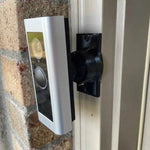
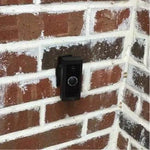
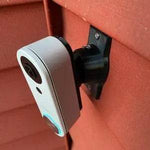
0-35° Adjustable Mount for the Ubiquiti UniFi G6 Entry Doorbell (UVC-G6-Entry)
Built for the Ubiquiti UniFi G6 Entry Doorbell — Ubiquiti's 2025 G6 generation doorbell with 5MP resolution, 180° diagonal field of view, IR night vision, on-device face recognition, and integration with both UniFi Protect (cameras) AND UniFi Access (door release). Replaces the older G4 Doorbell line. The bracket cradles the slim G6 Entry body (176 × 45 × 29.6 mm) and the 0-35° dual-axis ball joint aims the wide frame in any direction. Outdoor PETG, made-to-order in the USA.
Custom-Fit for the UniFi G6 Entry Doorbell
This bracket is shaped specifically for the Ubiquiti UniFi G6 Entry — model UVC-G6-Entry. The 2025 G6-generation Ubiquiti doorbell with: 5MP camera (100° H × 135° V × 180° D field of view — taller frame than the G4 line), 5m IR night vision, on-device face recognition, smart detections (people, vehicles, animals), two-way audio, integrated chime, IP55 weatherproof. PoE-powered (802.3af). Body dimensions: 176 × 45 × 29.6 mm (6.9 × 1.8 × 1.2"). Sold direct via the Ubiquiti Store. Integrates with UniFi Protect (NVR) AND optionally UniFi Access (for door release / smart-lock control).
Does NOT fit: the UniFi G6 Pro Entry (UVC-G6-Pro-Entry — 220mm tall, 12MP + package cam, larger body), the older G4 Doorbell or G4 Doorbell Pro (different body shapes), or the UniFi Doorbell Lite (UVC-Doorbell-Lite — 137mm body). Each UniFi doorbell has its own dedicated mount listing.
Confused which UniFi doorbell you have? The G6 Entry is the standard 5MP single-camera 2025 model — no package camera, no front touchscreen. If yours has a 1.8" front touchscreen for messages/PIN, that's a G4 Pro or G6 Pro Entry. If yours is shorter/smaller (~137mm) PoE-only, that's the Doorbell Lite.
UniFi Access Door Release + Face Recognition — Aim It Right
The G6 Entry's killer trick is integrating with UniFi Access — pair it with a UniFi smart lock and your front door unlocks automatically when face recognition matches a household member. That's hardware-level smart-home automation that no consumer doorbell delivers. Plus on-device face recognition (no cloud) means privacy-conscious households get the convenience without their face data leaving the property.
Face recognition needs the camera aimed at face level, not at the wall — so mount aim is critical. This 0-35° dual-axis swivel mount rotates the G6 Entry in any direction up to 35°, locks permanently with set screws, and routes the PoE Cat6 cleanly through the joint.
Two-Axis Aiming, 0-35° Range
One smooth ball joint. Aim left, right, up, or down — all the way to 35° in any direction. Lock the angle with set screws. Done.

Internal Wire Routing — Hidden & Protected
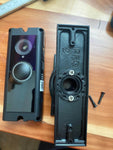
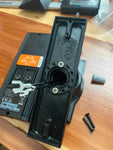
Cat6 PoE Ethernet enters from the wall, passes through the hidden internal channel inside the ball-joint mount, routes through the front adapter, and connects directly to the doorbell's RJ45 port. No exposed wiring, no weather risk.

Mount Dimensions
- Base Width: 1.8 inches
- Base Height: 3.1 inches
- Hole Spacing: 2-5/8 inches center-to-center
- Wall Extension at 0°: ~1.5 inches (low-profile)
- Narrow 3/4" baseplate option available for thin trim — see Customization below.
What You Get
- Custom Bracket for UniFi G6 Entry: Pre-shaped pocket fits the 176mm-tall G6 Entry body — flush, no rattle, no obstruction of the lens, mic, speaker, or LED status ring.
- Dual-Axis 0-35° Swivel: Aim the 180° diagonal 5MP frame precisely at face level for face recognition; lock with set screws.
- PoE Cat6 Pass-Through: Routes PoE Ethernet cleanly through the joint.
- Outdoor-Rated PETG: UV-stable, freeze-tolerant — exceeds the G6 Entry's IP55 rating.
- Siding Compatible: Flat surfaces and lapped siding up to 1.8" wide.
- Universal Base: Future-proof — switch doorbells later for a ~$10 adapter swap.
- Face Recognition Friendly: Aim adjustment lets you put the camera at exact face height for the visitor approach — critical for accurate face recognition.
Installing on the UniFi G6 Entry Doorbell
- Run PoE Cat6: The G6 Entry is PoE-only — no AC wiring option. Run a Cat6 from your UniFi PoE switch (or a PoE injector) to the doorbell location. Plan the cable route before mounting.
- Adopt to UniFi Protect First: Connect the G6 Entry indoors, adopt it via UniFi Protect, configure recording schedule, set up face recognition library (add household members), and verify chime works. Always easier indoors with full PoE power before mounting outside.
- Set Up UniFi Access (Optional): If you have a UniFi smart lock and want auto-unlock on face recognition, link the G6 Entry to UniFi Access in the UniFi controller. Test indoors before deploying.
- Mount the Base: Pull the Cat6 through the hole in the swivel base, position vertical (G6 Entry body is taller than wide), secure with #6 screws (PH2 driver). Anchors as needed.
- Attach the Swivel: Route the cable through the swivel center, attach to the base with four #4 / PH1 center screws.
- Connect & Mount the G6 Entry: Plug the Cat6 RJ45 into the doorbell. Snap onto the bracket using the screws PROVIDED WITH THIS MOUNT (PH1 driver) — not Ubiquiti's stock 20° wedge plate.
- Aim & Lock: Live View in UniFi Protect → adjust the swivel until the 180° diagonal frame catches visitors at face height. Critical for face recognition: the average adult face should be in the upper-third of the frame when standing 3 feet from the door. Tighten set screws.
- Configure Detections + Access Rules: In UniFi Protect: enable people/vehicle/animal detections, set detection zones, configure face-recognition triggered notifications. In UniFi Access: set the auto-unlock rules per household member.
Face recognition tip: training the face library works best when you upload several photos per person at different angles + lighting. The G6 Entry processes face recognition on-device (no cloud), so initial training takes ~10 minutes per person but stays private.
Questions About Fitment?
- Email: shop@doorbellmount.com
- Text/Call: 1-833-326-6868
Standard Color: Ships in Black or White. Other colors via Color Change Request.
Need to Buy Your UniFi Doorbell?
UniFi cameras are sold direct via the Ubiquiti Store. Quick links:
- UniFi G6 Entry — Ubiquiti Store (US)
- UniFi G6 Pro Entry (12MP + package cam) — Ubiquiti Store
- UniFi Doorbell Lite (budget single-cam) — Ubiquiti Store
- Ubiquiti UNVR — required for 24/7 local recording
Affiliate Disclosure: As an Amazon Associate, DoorbellMount.com earns from qualifying purchases at no extra cost to you. Ubiquiti Store links don't pay us a commission — just listed for convenience.
Angle Note: The 35° maximum is approximate; actual range varies slightly by surface and orientation.
3D-Printed Parts: Minor visible layer lines are normal and do not affect strength. Each mount is printed-to-order in our USA shop.
Aim your UniFi G6 Entry doorbell at the right spot — order the dedicated mount today.


