


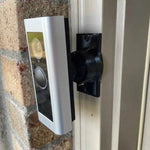
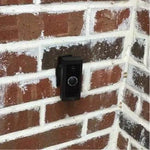
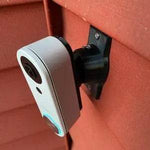
0-35° Adjustable Mount for the Aqara Doorbell Camera Hub G410
Built for the Aqara Doorbell Camera Hub G410 — Aqara's 2025 flagship that's both a 2K HomeKit Secure Video doorbell AND a smart home hub (Matter Controller, Thread Border Router, Zigbee 3.0) in one device. The bracket cradles the G410's chunky body without blocking the 175° wide-angle lens or the mmWave radar sensors, and the 0-35° dual-axis ball joint lets you fine-tune the 4:3 frame in two directions. Six AA batteries (~5 months) OR existing chime wiring — either install path works. Outdoor UV-stable PETG, made-to-order in the USA, ships matte black.
Custom-Fit for the Aqara Doorbell Camera Hub G410
This bracket is shaped specifically for the Aqara Doorbell Camera Hub G410 — Amazon ASIN B0F6CJF9M9 (95dB chime included, doubles as a smart home hub). Aqara's 2025 flagship doorbell with 2K resolution, 175° wide-angle lens, 4:3 aspect ratio, mmWave radar presence detection, HomeKit Secure Video, built-in Matter Controller + Thread Border Router + Zigbee 3.0 hub, dual-band Wi-Fi (2.4/5 GHz), local face recognition, and dual power: 6 AA batteries (~5 months) or hardwired to 12-24V chime wiring. $129 retail.
Does NOT fit: the older Aqara Video Doorbell G4 (1080p, no Matter hub — different body) or the Aqara G400 Wired (2K 3:4 head-to-toe, hardwire-only, completely different shape). Each Aqara model has its own dedicated mount listing. Also does not fit Ring, Nest, Wyze, Eufy, or any non-Aqara brand.
Confused which Aqara you have? The G410 has "Doorbell Camera Hub" on the box and a 4:3 aspect (wider than tall, but not square). It's the only Aqara doorbell with the chime that doubles as a Matter hub. If yours has 1:1 head-to-toe at 3:4 it's a G400; if it's older 1080p AAs only, it's a G4.
The Smartest Doorbell Aqara Makes — Aim It Right
The G410 isn't really just a doorbell. It's a Matter Controller and Thread Border Router and Zigbee hub in one device — meaning it can directly control compatible smart locks, sensors, and switches without needing a separate Aqara hub elsewhere. Plus the mmWave radar is genuinely better than PIR for catching slow-moving visitors.
That whole package is wasted if the camera framing is wrong. The 175° wide-angle 4:3 lens covers a huge area, but on an offset wall a third of that ends up looking at siding. This 0-35° dual-axis swivel mount rotates the whole assembly so the wide-angle frame catches everyone who comes to your door — including the mmWave radar zone, which Aqara configures relative to the camera frame.
Two-Axis Aiming, 0-35° Range
One smooth ball joint. Aim left, right, up, or down — all the way to 35° in any direction. Lock the angle with set screws. Done.

Internal Wire Routing — Hidden & Protected
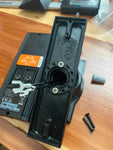
Low-voltage wires enter from the wall, pass through the hidden internal channel inside the ball-joint mount, route through the front adapter, and connect directly to the doorbell terminals. No exposed wiring, no weather risk.

Mount Dimensions
- Base Width: 1.8 inches
- Base Height: 3.1 inches
- Hole Spacing: 2-5/8 inches center-to-center
- Wall Extension at 0°: ~1.5 inches (low-profile)
- Narrow 3/4" baseplate option available for thin trim — see Customization below.
What You Get
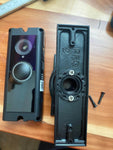
- Custom Bracket for Aqara G410: Pre-shaped pocket fits the chunky body — flush, no rattle, no obstruction of the lens or radar sensors.
- Dual-Axis 0-35° Swivel: Aim the 175° wide-angle 2K frame precisely; lock with set screws.
- Battery Compartment Stays Accessible: Designed so the rear AA battery door is reachable without unmounting.
- Wire Pass-Through: If hardwired to existing chime power for trickle-charge, the wires route cleanly through the joint.
- Matter Hub Friendly: Doesn't block the Wi-Fi/Thread/Zigbee antennas or the mmWave radar window.
- Outdoor-Rated PETG: UV-stable, freeze-tolerant — matches the G410's outdoor use case (note: the unit is splash-resistant, not waterproof per Aqara).
- Siding Compatible: Flat surfaces and lapped siding up to 1.8" wide.
- Universal Base: Future-proof — switch doorbells later for a ~$10 adapter swap.
Installing on the Aqara Doorbell Camera Hub G410
-
Pick Battery or Wired: The G410 ships with 6 AA batteries for ~5 month life, or you can hardwire to existing 12-24V chime power for continuous trickle-charge.
If hardwiring: turn the breaker off first. The G410 needs 12-24V AC at the doorbell location. Standard mechanical chimes need a chime resistor or be replaced with the included G410 chime hub.
-
Mount the Base: Pull wires through (skip if battery), position vertically or horizontally on your siding/trim, screw in with #6 screws (PH2 driver). Anchors if not into a stud.
Aqara explicitly notes the G410 is splash-resistant but NOT waterproof. Mount under an overhang/porch ceiling if your install location gets direct rain.
- Attach the Swivel: Route wires through (skip if battery), screw onto the base with four #4 / PH1 center screws.
- Insert Batteries (or Wire): If battery: install the included 6 AAs. If hardwiring: connect the two transformer leads to the back of the G410.
- Set Up the Hub Indoors First: Plug the G410 chime/hub indoors near the front door, pair to your Wi-Fi via the Aqara Home app. The chime IS the Matter Controller / Thread Border Router / Zigbee hub — so place it where it can reach your existing smart home devices.
- Pair the Doorbell: Add the G410 to the Aqara Home app and scan the HomeKit QR code. Connect via 2.4 GHz or 5 GHz Wi-Fi.
- Snap In + Aim & Lock: Use the screws PROVIDED WITH THIS MOUNT (PH1 driver). Open Live View → adjust swivel until 175° frame covers your porch → tighten set screws.
- Configure mmWave Radar Zones: In the Aqara Home app, set the radar detection zones to match the area you actually want monitored (excludes street, includes path/porch). Lock in the angle BEFORE doing this so the zones stay accurate.
Smart home note: because the G410 is also a Matter/Thread/Zigbee hub, take 5 extra minutes after mounting to migrate or pair existing Aqara/Matter accessories. Doing it once you're locked in saves repeated mounted-camera trips later.
Questions About Fitment?
- Email: shop@doorbellmount.com
- Text/Call: 1-833-326-6868
Standard Color: Ships in Black. Other colors via Color Change Request.
Need to Buy Your Aqara Doorbell?
Quick affiliate links to the Aqara doorbell lineup:
- Aqara Doorbell Camera Hub G410 (2K + Matter Hub + mmWave radar) — B0F6CJF9M9
- Aqara Doorbell Camera G400 Wired (2K 3:4, PoE/Hardwired, Wi-Fi 6) — B0G52BVRLQ
- Aqara Video Doorbell G4 (1080p, 6 AA Battery or Wired) — B0BPHTL7MG
- Browse all Aqara doorbells on Amazon →
Affiliate Disclosure: As an Amazon Associate, DoorbellMount.com earns from qualifying purchases at no extra cost to you. Pricing is controlled by Amazon and may change.
Angle Note: The 35° maximum is approximate; actual range varies slightly by surface and orientation.
3D-Printed Parts: Minor visible layer lines are normal and do not affect strength. Each mount is printed-to-order in our USA shop.
Mount the smartest doorbell-hub on Aqara's lineup the right way — order today.


