


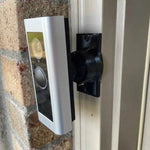
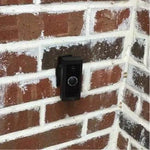
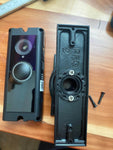
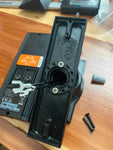
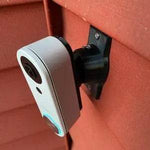
0-35° Adjustable Mount for the Alula Video Doorbell Camera (CAM-DB-JS1)
Engineered for the Alula Video Doorbell Camera (CAM-DB-JS1) — Alula's professional-monitored security doorbell, designed to integrate with their Connect+ alarm panels and Smart Security app. 1080p HD, 140° field of view, two-way audio, motion detection, IP55 weatherproof, and 16ft IR night vision. The bracket is shaped specifically for the Alula's body (different from any consumer-doorbell brand) and the 0-35° dual-axis ball joint aims the wide frame in any direction. Outdoor PETG, made-to-order in the USA.
Custom-Fit for the Alula CAM-DB-JS1 Video Doorbell
This bracket is shaped specifically for the Alula Video Doorbell Camera — model CAM-DB-JS1, Amazon ASIN B0BHTSTRCS. Alula's 1080p HD video doorbell with 2MP image sensor, 140° field of view, two-way audio (radio), Wi-Fi connectivity, 16ft IR night vision, IP55 weatherproof rating, motion detection, and microSD card included. Designed to work as a standalone doorbell OR as a video component in an Alula Connect+ or BAT-Connect professionally-monitored security system. Controlled via the Alula Smart Security app or the Slimline Touchpad PRO.
Does NOT fit: the newer Alula CAM-DB-HS2-AI (2K AI version, primarily sold through dealers — different body). Does not fit Ring, Nest, Wyze, Eufy, Aqara, Tapo, Arlo, ecobee, Reolink, myQ, or any non-Alula brand. The Alula CAM-DB-JS1 has its own footprint — make sure your model is the JS1 specifically before ordering.
How to confirm: The CAM-DB-JS1 is the version sold through Alula dealers AND directly on Amazon as a standalone doorbell. It says 'CAM-DB-JS1' on the product label and the original Alula Video Doorbell box. If your doorbell came with your Alula alarm system as part of an installer-only kit, check the model sticker on the back — if it's HS2-AI, that's a different body.
Built for Pro-Monitored Security Systems
The Alula doorbell is unusual: it's not really a consumer product, it's a video peripheral for Alula's professional alarm panels (the Connect+ and BAT-Connect that DIY security blogs and security dealers install). It plays nicely with the Alula Smart Security app's arm/disarm flows and can show on the Slimline Touchpad PRO at the front door.
1080p HD at 140° is solid for visitor identification, but only when the camera is pointed at the actual approach. This 0-35° dual-axis swivel mount rotates the Alula in any direction up to 35° so the frame captures the walkway instead of the wall — locked permanently with set screws. Microphone and IR LEDs stay clear of the bracket.
Two-Axis Aiming, 0-35° Range
One smooth ball joint. Aim left, right, up, or down — all the way to 35° in any direction. Lock the angle with set screws. Done.

Internal Wire Routing — Hidden & Protected
Low-voltage wires enter from the wall, pass through the hidden internal channel inside the ball-joint mount, route through the front adapter, and connect directly to the doorbell terminals. No exposed wiring, no weather risk.

Mount Dimensions
- Base Width: 1.8 inches
- Base Height: 3.1 inches
- Hole Spacing: 2-5/8 inches center-to-center
- Wall Extension at 0°: ~1.5 inches (low-profile)
- Narrow 3/4" baseplate option available for thin trim — see Customization below.
What You Get
- Custom Bracket for Alula CAM-DB-JS1: Pre-shaped pocket fits the Alula body specifically — flush, no rattle, no obstruction of the 140° lens, microphone, or 16ft IR LEDs.
- Dual-Axis 0-35° Swivel: Aim the 1080p HD frame precisely; lock with set screws.
- Wire Pass-Through: Routes the included low-voltage power wires through the joint cleanly.
- Outdoor-Rated PETG: Matches or exceeds the Alula's IP55 rating — UV-stable, freeze-tolerant.
- Siding Compatible: Flat surfaces and lapped siding up to 1.8" wide.
- Universal Base: Future-proof — switch doorbells later for a ~$10 adapter swap.
- Pro-Install Friendly: Compatible with Alula's wiring patterns from Connect+ and BAT-Connect installs.
Installing on the Alula CAM-DB-JS1
- Coordinate With Your Alula Installer (If Applicable): If your Alula doorbell came as part of a professionally-monitored security install, coordinate the mount swap with your dealer — replacing the doorbell mount can briefly take it off-line and may flag a tamper alert on the alarm panel.
- Verify Wiring: Confirm your existing wiring matches what the Alula needs (typically 16-24V AC chime power, but follow Alula's spec). The included microSD card slot is on the back — make sure the card is in before mounting.
-
Power Down: Turn the breaker off at the chime circuit. Verify with a tester at the existing doorbell wires before pulling them through the mount.
- Mount the Base: Pull the doorbell wires through the hole in the swivel base, position vertically or horizontally on your siding/trim, secure with #6 screws (PH2 driver). Anchors as needed.
- Attach the Swivel: Route the wires through the swivel center, attach to the base with four #4 / PH1 center screws.
- Connect & Mount the Alula: Connect the wires to the doorbell terminals per Alula's wiring diagram. Snap onto the bracket using the screws PROVIDED WITH THIS MOUNT (PH1 driver) — not Alula's stock plate.
- Pair via Alula Smart Security App or Connect+: Restore power. If standalone: pair via the Alula Smart Security app. If part of a Connect+/BAT-Connect system: re-add the doorbell as a video peripheral via the panel.
- Aim & Lock: Live View → adjust the swivel until the 140° frame covers your porch path → tighten set screws.
Pro-monitoring note: if your alarm panel is monitored, swapping the doorbell mount may cause a tamper signal that gets called through to the central station. Either coordinate the swap with your monitoring service first, or expect a courtesy phone call asking if everything is OK.
Questions About Fitment?
- Email: shop@doorbellmount.com
- Text/Call: 1-833-326-6868
Standard Color: Ships in Black or White. Other colors via Color Change Request.
Need to Buy Your Alula Doorbell?
Quick affiliate links to Alula doorbells on Amazon:
- Alula CAM-DB-JS1 Video Doorbell — 1080p HD, 140° FOV, Wi-Fi, IP55 — B0BHTSTRCS
- Browse all Alula doorbells on Amazon →
Affiliate Disclosure: As an Amazon Associate, DoorbellMount.com earns from qualifying purchases at no extra cost to you. Pricing is controlled by Amazon and may change.
Angle Note: The 35° maximum is approximate; actual range varies slightly by surface and orientation.
3D-Printed Parts: Minor visible layer lines are normal and do not affect strength. Each mount is printed-to-order in our USA shop.
Aim your Alula doorbell at the right spot — order the dedicated mount today.


